
Check Best Thermostat Pricing in Amazon
** As an Amazon Associate, I earn from qualifying purchases.
Are you confused about whether your thermostat fan should be set to “Auto” or “On”? You’re not alone.
Choosing the right setting can make a big difference in your comfort, energy bills, and even your HVAC system’s lifespan. But which one is really best for you? You’ll discover the pros and cons of both options, helping you make a smart choice that keeps your home cozy without wasting energy.
Keep reading to find out how a simple switch could improve your daily comfort and save you money.
Thermostat Fan Modes
Thermostat fan modes control how air moves through your home. Choosing the right mode affects comfort and energy use. Understanding these modes helps you get the best from your heating and cooling system.
Auto Mode Basics
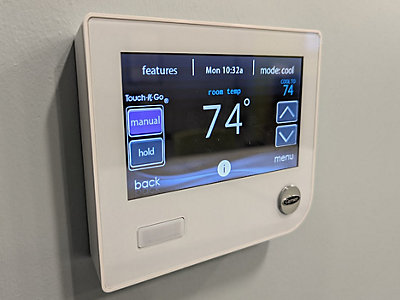
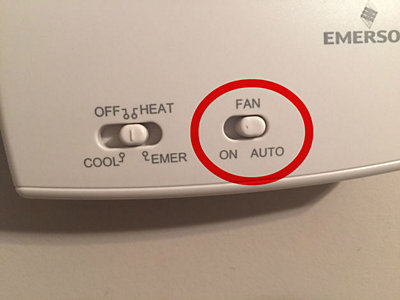
Auto mode turns the fan on only when heating or cooling runs. The fan stops when the system reaches the set temperature. This saves energy by running the fan only as needed. It also helps keep your home quiet most of the time.
Fan Mode Basics
Fan mode runs the fan continuously, even when heating or cooling is off. This moves air around your home all the time. It can improve air circulation and help even out temperatures. The downside is higher energy use and a noisier system.
Credit: buckeyeheat.com
Energy Efficiency
Energy efficiency matters for saving money and protecting the environment. Your thermostat settings affect how much energy your HVAC system uses. Choosing the right mode can lower your energy bills and reduce waste. Understanding how Auto and Fan modes use energy helps you decide which is best.
Energy Usage In Auto Mode
In Auto mode, the system runs the fan only when heating or cooling is active. This means the fan uses energy only when needed. The system shuts off the fan after reaching the set temperature. This saves electricity by avoiding unnecessary fan operation. Auto mode helps keep energy use low and costs down.
Energy Usage In Fan Mode
Fan mode runs the fan continuously, even if the system is not heating or cooling. This constant running uses more electricity than Auto mode. The fan circulates air but does not change the temperature. This can increase energy bills without improving comfort much. Use Fan mode only when constant air circulation is needed.
Comfort Levels
Comfort levels in your home depend a lot on how your thermostat fan is set. The choice between “Auto” and “Fan On” affects how steady the temperature feels and how air moves around. Picking the right setting can make your space more pleasant and improve your daily living.
Temperature Consistency
The “Auto” setting runs the fan only when the heating or cooling system is active. This helps keep the temperature steady. The fan turns off when the system stops, reducing temperature swings.
With the “Fan On” setting, the fan runs all the time. This can mix warm and cool air more evenly. But it may also cause slight temperature changes because the system runs less often.
Air Circulation Effects
Continuous air movement with the fan on improves air circulation. It helps reduce hot or cold spots in your rooms. It can also help remove stale air and bring fresh air in.
The “Auto” fan setting limits air movement to system cycles. This may cause air to feel still during off times. It can also reduce dust and allergens spread since the fan runs less.
Credit: www.cooltoday.com
Air Quality And Filtration
Air quality and filtration play a key role in home comfort. The way your thermostat controls the fan affects how air moves and how clean it stays. Understanding the impact of Auto and Fan modes helps you choose the best setting for healthier indoor air.
Impact Of Auto Mode
In Auto mode, the fan runs only when heating or cooling is active. This limits the air circulation to times when the system works. It helps save energy by not running the fan constantly. Filters capture dust and allergens only during these periods. This can reduce overall filtration but keeps energy use low.
Impact Of Fan Mode
Fan mode runs the fan continuously, regardless of heating or cooling. This constant airflow moves air through filters all the time. It can improve indoor air quality by filtering more dust and particles. However, it uses more electricity because the fan never stops. The constant movement can also spread dust if filters are dirty.
Noise Considerations
Noise is an important factor when choosing between thermostat settings. It affects comfort and daily life. Some people prefer quieter environments. Others do not mind background sounds. Understanding noise levels in each mode helps you decide.
Sound Levels In Auto Mode
In auto mode, the fan runs only when needed. This means less noise overall. The system turns on and off based on temperature. Quiet periods happen when the fan is off. Noise mainly comes from the HVAC system starting up. The fan speed may change during operation. This can cause slight variations in sound. Overall, auto mode is usually quieter at home.
Sound Levels In Fan Mode
Fan mode keeps the fan running all the time. This creates a constant background noise. The sound is steady and predictable. Some find this noise relaxing or white noise-like. Others may find it distracting or loud. The fan speed stays the same in this mode. Noise does not vary much. Continuous sound may affect sleep or focus for some people.
When To Use Auto Mode
Auto mode works best when you want the system to cool or heat only as needed. It saves energy by running the fan only during temperature changes. Use it to keep your home comfortable without constant airflow.
What Does Auto Mode Do?
Auto mode controls your HVAC system to keep the temperature steady. It turns the fan and heater or cooler on and off as needed. This helps maintain a comfortable room temperature without running the fan all the time.
Check Best Thermostat Pricing in Amazon
** As an Amazon Associate, I earn from qualifying purchases.
Best Times To Use Auto Mode
Use auto mode during mild weather when temperature changes are small. It saves energy by running the system only when necessary. This reduces wear on your HVAC system and lowers your electric bill.
Benefits Of Using Auto Mode
Auto mode keeps your home quiet because the fan stops when not needed. It also helps keep air cleaner by limiting how long the fan runs. This can reduce dust and allergens circulating in your home.
When To Use Fan Mode
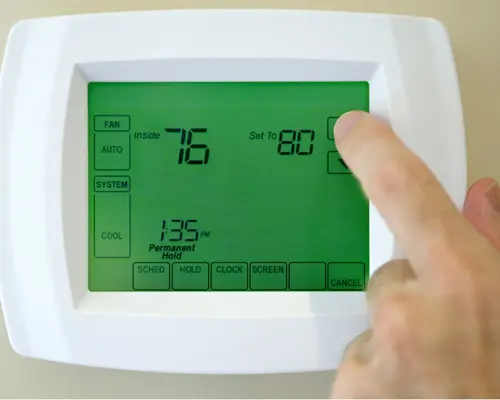
Fan mode on a thermostat helps circulate air without heating or cooling. This setting can improve air flow and comfort inside your home. Knowing when to use fan mode saves energy and keeps your space fresh.
Fan mode works well during mild weather. It moves air around to keep rooms from feeling stuffy. The fan runs continuously or in intervals based on your thermostat’s design.
Improving Air Circulation
Use fan mode to spread air evenly in your home. It helps balance temperature differences between rooms. This reduces hot or cold spots and makes the whole house feel better.
Reducing Humidity
Fan mode can help lower humidity inside your home. Moving air speeds up evaporation and dries damp areas. This is useful in bathrooms and kitchens after showers or cooking.
Saving Energy On Mild Days
Choose fan mode when you don’t need heating or cooling. The fan uses less electricity than the air conditioner or heater. It keeps air fresh without raising energy bills.
Removing Odors And Stale Air
Fan mode refreshes air by pushing stale air out. It clears smells from cooking, pets, or smoke. Running the fan helps keep indoor air clean and pleasant.
Credit: www.ars.com
Tips For Optimal Thermostat Settings
Setting your thermostat correctly helps save energy and keeps your home comfortable. Small changes make a big difference in heating and cooling costs. Follow these tips to get the best settings for your thermostat.
Choosing between “Auto” and “Fan” modes matters. Understanding each mode helps you decide the best use for your home. These tips guide you to set your thermostat for comfort and efficiency.
Use Auto Mode For Energy Savings
Auto mode runs the fan only when heating or cooling is active. This saves electricity by not running the fan all the time. It keeps your home at a steady temperature without wasting energy.
Use Fan Mode For Air Circulation
Fan mode runs the fan continuously, even without heating or cooling. It helps spread air evenly throughout the house. This mode can improve air quality but uses more electricity.
Set Temperatures For Comfort And Savings
Set your thermostat to 68°F (20°C) in winter and 78°F (26°C) in summer. These temperatures balance comfort and energy use well. Adjust settings slightly for personal comfort without big energy costs.
Use A Programmable Thermostat
Programmable thermostats change settings automatically based on your schedule. They lower energy use when you are away or asleep. This keeps costs down without sacrificing comfort.
Keep Your Thermostat Clean And Well-placed
Dust and dirt can affect thermostat sensors. Clean your thermostat regularly to keep it working right. Place it away from direct sunlight and vents for accurate readings.
Frequently Asked Questions
Should Thermostat Fan Be Set To Auto Or On?
Setting the thermostat fan to auto saves energy by running only when heating or cooling is active. The “on” setting circulates air continuously, improving air circulation but increasing energy use. Choose “auto” for efficiency and “on” for constant air movement.
What Happens If Fan Is Always On Thermostat?
If the fan runs continuously, it improves air circulation and filtration. However, it increases electricity usage and may cause your HVAC system to wear out faster. Use this setting if you need consistent airflow, but expect higher energy bills.
Does Auto Fan Setting Save Energy?
Yes, the auto fan setting saves energy by running the fan only during heating or cooling cycles. This reduces electricity consumption compared to running the fan continuously. It’s the more efficient choice for most households.
Can Fan Setting Affect Indoor Air Quality?
Yes, running the fan continuously helps circulate and filter indoor air better. It reduces allergens and stale air. However, it uses more energy. The auto setting balances air quality and energy savings.
Conclusion
Choosing between auto and fan mode depends on your needs. Auto saves energy by running only when needed. Fan mode moves air continuously for better circulation. Auto helps keep your home cooler or warmer efficiently. Fan mode can reduce humidity and keep air fresh.
Think about comfort, energy use, and air quality. Try both settings to see which works best for you. Balance comfort with savings to enjoy your space fully. Your thermostat choice can impact your home’s feel and cost.
Check Best Thermostat Pricing in Amazon
** As an Amazon Associate, I earn from qualifying purchases.