
Check Best Thermostat Pricing in Amazon
** As an Amazon Associate, I earn from qualifying purchases.
Are you tired of constantly adjusting your thermostat to keep your home comfortable? Learning how to program your Honeywell Proseries Thermostat can save you time, energy, and money.
Imagine setting your heating and cooling to match your daily routine automatically, so your home is always just the right temperature when you walk in. In this guide, you’ll discover simple, step-by-step instructions to take full control of your thermostat.
By the end, you’ll be able to create a schedule that fits your lifestyle perfectly—making your home smarter and your life easier. Keep reading to unlock the full potential of your Honeywell Proseries Thermostat.
Getting To Know Your Thermostat
Getting to know your Honeywell Proseries thermostat is the first step to easy temperature control. This device helps you save energy and keep your home comfortable. Understanding its features and controls makes programming simple and quick.
Key Features Of Honeywell Proseries
The Honeywell Proseries thermostat offers clear temperature settings. It supports multiple daily programs for heating and cooling. You can set different temperatures for morning, day, evening, and night. The device works with most heating and cooling systems. It also has a backlit display for easy reading in low light. The Proseries includes a filter change reminder to keep your system efficient.
Understanding The Display And Buttons
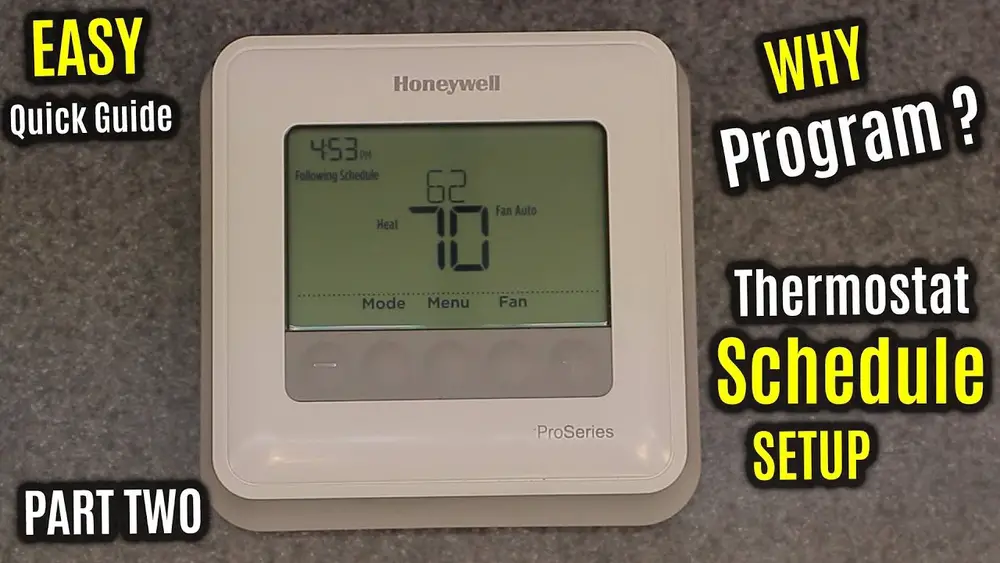
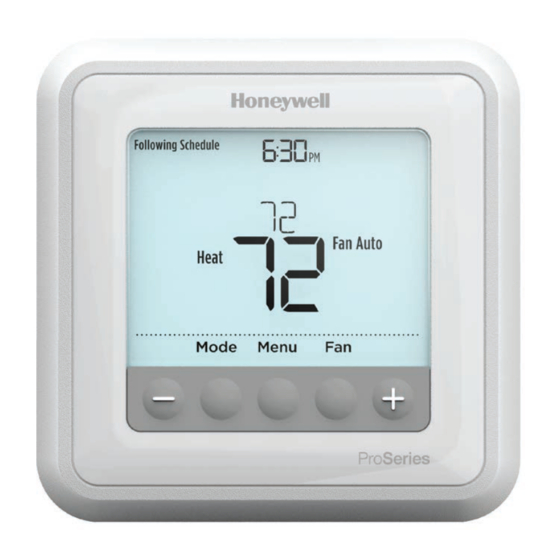
The display shows the current temperature and system status. It also shows the time and programmed schedules. There are simple buttons to adjust temperature up or down. Mode buttons let you switch between heating, cooling, or off. A fan button controls the fan settings manually. The system button helps choose the type of system you have. Each button’s function is clear and easy to remember.
Preparing For Installation
Preparing for the installation of your Honeywell Proseries thermostat is a key step. It makes the process smoother and safer. Taking time to gather the right tools and understand safety rules helps avoid problems. This section guides you through what to prepare before starting.
Tools And Materials Needed
Gather the tools before you begin. A screwdriver is essential for removing and attaching the thermostat. Have a drill ready if new holes are needed. A level helps keep the thermostat straight on the wall. Prepare wire strippers and electrical tape for handling wires. Keep the Honeywell Proseries thermostat and its user manual close. A pencil is useful to mark spots on the wall. Make sure you have all these items to avoid delays.
Safety Precautions
Turn off power to your heating and cooling system at the breaker box. This step prevents electrical shock or damage. Use a voltage tester to check wires before touching them. Keep your hands dry and avoid working in wet areas. Wear safety glasses to protect your eyes from dust or debris. Follow all instructions in the user manual closely. Safety protects you and keeps your thermostat working well.
Removing The Old Thermostat
Removing the old thermostat is the first step to install your Honeywell Proseries thermostat. This task requires care to keep your wiring safe. Follow these simple steps to make the process smooth and secure.
Turning Off The Power
Safety is key. Turn off the power to your heating and cooling system before starting. Use the circuit breaker or fuse box to cut the electricity. This prevents shocks or damage to your system.
Detaching The Old Unit
Remove the cover of the old thermostat gently. Look for screws or clips holding it in place. Unscrew or unclip these parts carefully. Pull the thermostat away from the wall slowly to expose the wires.
Take a photo of the wiring. This helps during the new thermostat installation. Label each wire with tape and a marker. After labeling, disconnect the wires from the old thermostat.
Installing The Honeywell Proseries
Installing the Honeywell Proseries thermostat is the first step to controlling your home’s temperature easily. The process involves mounting the base, connecting wires, and attaching the faceplate. Each step is simple and important to ensure the thermostat works correctly.
Mounting The Thermostat Base
Start by choosing a good location on your wall. Pick a spot away from direct sunlight and drafts. Use the base as a guide to mark screw holes. Drill the holes carefully and insert anchors if needed. Secure the base tightly with screws to keep it steady.
Wiring Connections Explained
Turn off the power to your heating and cooling system before handling wires. Match each wire to the correct terminal on the base. Common wires include R, W, Y, G, and C. Use the labels or your old thermostat as a reference. Tighten each wire under its terminal screw firmly.
Attaching The Thermostat Faceplate
After wiring, align the faceplate with the base. Press it gently until it clicks into place. Check that the faceplate fits snugly and does not move. Restore the power and watch the screen light up. Your thermostat is now ready for programming.
Setting Up Your Thermostat
Setting up your Honeywell Proseries thermostat is a simple process. It ensures your home stays comfortable and energy-efficient. This section guides you through the basic steps to get your thermostat ready for use.
Configuring Date And Time
Start by setting the correct date and time on your thermostat. This helps the device follow your daily schedule accurately. Use the touchscreen or buttons to select the current day, month, year, hour, and minute. Save your settings before moving on. Accurate time keeps your heating and cooling on track.
Selecting System Type
Next, choose the system type installed in your home. Your Honeywell Proseries supports heating, cooling, or heat pump systems. Check your HVAC system manual if unsure. Select the correct option on the thermostat menu. This step ensures your thermostat controls the system properly and avoids damage.
Adjusting Temperature Settings
Finally, set your preferred temperature for different times of the day. Program morning, daytime, evening, and night temperatures to match your routine. Use the temperature arrows to increase or decrease the heat or cooling. Save each setting before exiting. Proper temperature settings save energy and improve comfort.

Credit: www.youtube.com
Check Best Thermostat Pricing in Amazon
** As an Amazon Associate, I earn from qualifying purchases.
Programming Daily Schedules
Programming daily schedules on your Honeywell Proseries thermostat helps save energy and keeps your home comfortable. You can set different temperatures for different times of the day. This way, your heating or cooling runs only when needed. Let’s explore how to set up these schedules easily.
Creating Weekday And Weekend Programs
Start by choosing the days you want to program. The thermostat lets you set schedules for weekdays and weekends separately. This helps you have different settings for workdays and rest days. Select the “Weekday” option to program Monday through Friday. Then, set times and temperatures for morning, day, evening, and night periods. Repeat the process for the “Weekend” option. This way, your home stays cozy when you are home and saves energy when you are away.
Using Preset Schedule Options
The Honeywell Proseries thermostat offers preset schedules. These are ready-made programs based on common routines. You can select one that fits your lifestyle. For example, a preset might lower the temperature at night and raise it in the morning. Using these presets saves time and still controls your home temperature well. You can always adjust them later if needed.
Customizing Temperature Periods
You can change the temperature for each time period during the day. Pick a start time and set the temperature you want. Do this for morning, afternoon, evening, and night. The thermostat allows you to add or remove periods too. Customizing these settings helps match your daily routine closely. It also reduces energy waste by avoiding heating or cooling empty rooms.
Advanced Programming Features
The Honeywell Proseries thermostat offers advanced programming features. These features help you control your home’s temperature with ease. They provide flexibility and save energy. Learning these options enhances your comfort and reduces utility bills.
Using the advanced settings allows you to customize your schedule. You can set different temperatures for various times and days. These features are perfect for busy homes and changing weather.
Vacation And Hold Modes
Vacation mode lets you set the thermostat for a long absence. It keeps the house at a safe temperature without wasting energy. Hold mode pauses your regular schedule. It maintains one temperature until you cancel it. Both modes prevent unnecessary heating or cooling. They are simple to activate and save money.
Energy Saving Tips
Set your thermostat lower in winter and higher in summer. Use programmable schedules to avoid heating or cooling empty rooms. Take advantage of the system’s smart features to run less during peak hours. Regularly clean your thermostat and replace batteries if needed. These small steps can lower energy bills and extend your system’s life.
Troubleshooting Common Issues
If your thermostat does not respond, check the power source first. Reset the device by turning it off and on again. Make sure the batteries are fresh and installed correctly. Check that the wiring is secure if your system is hardwired. Consult the user manual for error codes and solutions. Most problems are easy to fix without a technician.
Credit: www.manualslib.com
Maintaining Your Thermostat
Maintaining your Honeywell Proseries thermostat keeps it working well and lasting longer. Simple care steps help avoid problems and save energy. Regular checks make sure your thermostat stays accurate and responsive.
Regular Cleaning
Dust and dirt can build up on your thermostat’s screen and buttons. Use a soft, dry cloth to wipe it gently. Avoid water or cleaning sprays to prevent damage. Clean the thermostat at least once a month. This keeps the screen clear and buttons working smoothly.
Battery Replacement
Most Honeywell Proseries models use batteries to operate. Check battery life every few months. Replace batteries when the screen dims or the thermostat stops responding. Use fresh, high-quality batteries for best performance. Removing old batteries prevents leaks and damage inside the device.
Software Updates
Software updates improve your thermostat’s features and fix bugs. Check for updates through the thermostat menu or Honeywell app. Install updates as soon as they become available. Updated software keeps your thermostat running smoothly and adds new functions.

Credit: www.ecicomfort.com
Frequently Asked Questions
How Do I Set The Time On A Honeywell Proseries Thermostat?
To set the time, press the “System” button, select “Set Clock,” then use arrow keys to adjust hours and minutes. Confirm by pressing “Done. ” This ensures your thermostat follows the correct schedule for heating and cooling.
Can I Program Different Schedules For Weekdays And Weekends?
Yes, the Honeywell Proseries allows separate weekday and weekend schedules. Use the “Schedule” button to customize temperature settings for each day, optimizing comfort and energy efficiency throughout the week.
How Do I Reset The Honeywell Proseries Thermostat To Factory Settings?
To reset, press and hold the “System” and “Fan” buttons simultaneously for 5 seconds. The screen will flash, indicating a reset. This clears all programming and restores default settings.
What Temperature Range Can I Set On This Thermostat?
The Honeywell Proseries thermostat supports a temperature range from 40°F to 90°F. This wide range helps maintain comfort in various climates and seasons.
Conclusion
Programming your Honeywell Proseries thermostat is simple and quick. Just follow the steps carefully and take your time. Setting the right schedule helps save energy and money. Enjoy a comfortable home all year round. This guide makes it easy to control your heating and cooling.
Stay warm in winter and cool in summer without hassle. You now have the tools to manage your thermostat well. Keep this guide handy for future adjustments or changes. Small efforts lead to big comfort in your home.
Check Best Thermostat Pricing in Amazon
** As an Amazon Associate, I earn from qualifying purchases.