
Check Best Thermostat Pricing in Amazon
** As an Amazon Associate, I earn from qualifying purchases.
Are you ready to upgrade your home with a smart thermostat but worried about the confusing C wire? You’re not alone.
Many people hesitate because their current setup lacks this essential wire. The good news? You can install a smart thermostat without a C wire—and keep your home comfortable and energy-efficient. In this guide, you’ll discover simple, practical steps that anyone can follow.
By the end, you’ll have the confidence to make the switch without calling a pro or rewiring your entire system. Let’s get started and take control of your home’s temperature the smart way!
Check Thermostat Compatibility
Before installing a smart thermostat without a C wire, check if your system supports it. Not all thermostats or homes work without a C wire. This step saves time and avoids damage. Learn about your current wiring and the thermostat’s needs first.
Identify Your Current Wiring Setup
Turn off power to your HVAC system. Remove your old thermostat’s cover. Look at the wires connected to the terminals. Note the colors and labels of each wire. Common wires include R, W, Y, G, and C. If you do not see a C wire, your system may lack a dedicated common wire. Take a clear photo for reference.
Confirm Smart Thermostat Requirements
Read the smart thermostat’s installation guide carefully. Check if it needs a C wire to work properly. Some models support operation without a C wire using batteries or power stealing. Verify compatibility with your HVAC system type. Look for a list of supported systems in the manual or online. Confirm power needs and wiring options before buying.

Credit: thenomadstudio.com
Gather Necessary Tools
Gathering the right tools is the first step to install a smart thermostat without a C wire. Having everything ready helps avoid delays and mistakes. Prepare your workspace and tools before starting the installation.
Basic Tools Checklist
- Screwdriver (flathead and Phillips)
- Wire stripper or cutter
- Voltage tester
- Drill (optional)
- Level
- Smart thermostat installation guide
Additional Items You May Need
- Wire nuts or connectors
- Extra wire for extending connections
- Electrical tape
- Battery for thermostat (if not included)
- Smartphone or tablet for setup
Turn Off Power Safely
Turning off power safely is the first step when installing a smart thermostat without a C wire. It protects you from electric shock and prevents damage to your device. Always handle electricity with care to ensure a smooth installation.
Locate The Circuit Breaker
Find the main electrical panel in your home. It is usually in the basement, garage, or utility room. Open the panel door and look for the breaker labeled for your heating and cooling system. This breaker controls power to your thermostat.
Switch the breaker to the “off” position. This stops electricity from flowing to your HVAC system. If unsure which breaker to turn off, turn off the main breaker. This cuts power to the entire house but guarantees safety.
Verify Power Is Off
Check that the power is truly off before starting work. Use a non-contact voltage tester near thermostat wires. The tester lights up or beeps if power is still present. If no signal, the power is off and safe to proceed.
Also, try turning your HVAC system on using the thermostat. It should not respond. This confirms no power runs to the system. Never skip this step. It ensures your safety during installation.
Remove Old Thermostat
Removing your old thermostat is the first step in installing a smart thermostat without a C wire. This process helps you prepare the wall and wires for the new device. Careful removal protects your wiring and makes installation easier.
Turn off the power to your heating and cooling system before starting. This ensures safety and avoids damage to the system. Once the power is off, you can begin detaching the old thermostat.
Detach Faceplate
Start by gently pulling the faceplate away from the wall. Some models have clips, others use screws. Use a screwdriver if screws hold the faceplate in place. Keep the screws safe for later use. Avoid pulling wires or forcing the faceplate off.
Label Existing Wires
After removing the faceplate, you will see several wires connected to the base. Label each wire with tape and a marker. Write down the letter or color code for each wire. This step helps you remember which wire goes where. Take a clear photo for backup before disconnecting wires.
Connect Wires Without C Wire
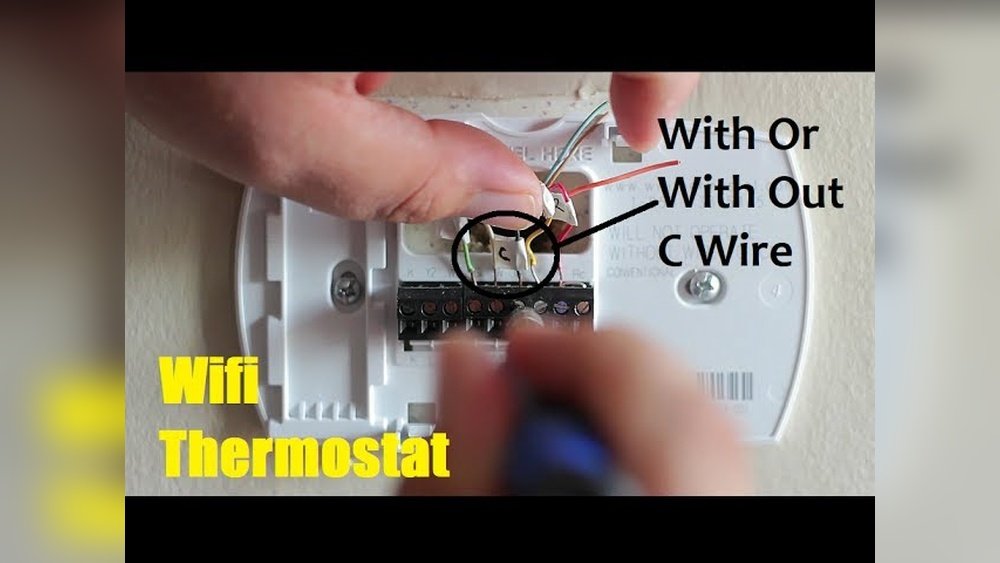
Connecting wires without a C wire can be tricky. The C wire supplies constant power to your smart thermostat. Without it, the thermostat might lose power or behave oddly. Luckily, there are ways to connect your thermostat without needing a C wire. These methods help your device get the power it needs to work properly.
Use Power Extender Kit
A Power Extender Kit (PEK) is a simple solution for no C wire. It comes with extra wires and parts. The kit adds a common wire function using your existing wires. Installation is easy and does not require new wiring. The kit connects between your thermostat and HVAC control board. It balances power for your smart thermostat to run smoothly.
Alternative Wiring Methods
Some thermostats support alternative wiring setups. One method uses the G wire as a common wire. This means you lose the fan control but keep power to the thermostat. Another way is using a battery-powered thermostat. It does not need a C wire at all. Each home is different, so check your thermostat’s manual for specific instructions.
Check Best Thermostat Pricing in Amazon
** As an Amazon Associate, I earn from qualifying purchases.

Credit: www.klebernobrega.com.br
Mount The Smart Thermostat
Mounting your smart thermostat is a key step in the installation process. It ensures the device stays secure and works properly. Proper mounting helps the thermostat read your home’s temperature accurately. This section explains how to attach the base and secure the thermostat unit easily.
Attach Base To Wall
Start by placing the base plate on the wall. Use a level tool to keep it straight. Mark the screw holes with a pencil. Drill small holes where you marked. Insert wall anchors if needed for extra support. Screw the base firmly into the wall. Make sure it feels stable and does not move.
Secure Thermostat Unit
Next, connect the wires to the thermostat base. Follow the instructions for your specific model carefully. Once connected, align the thermostat unit with the base. Press the unit gently until it clicks into place. Check that it fits snugly with no gaps. Your smart thermostat is now ready to use.
Restore Power And Setup
After wiring your smart thermostat without a C wire, restoring power is the next step. This process ensures your thermostat powers up correctly and can communicate with your heating and cooling system. Careful setup makes sure your device runs smoothly and saves energy.
Turn On Circuit Breaker
Locate your home’s electrical panel. Find the circuit breaker that controls your HVAC system. Flip the switch to the ON position. This action restores power to the thermostat and HVAC system. Wait a few moments for the thermostat to start up. Watch for any display or light that shows power is back on.
Configure Thermostat Settings
Follow the on-screen instructions on your thermostat. Set your preferred language and time zone first. Enter your Wi-Fi details to connect the thermostat to the internet. Choose your heating and cooling system type. Adjust temperature settings to match your comfort needs. Save all settings to finish the setup. Your thermostat is now ready to use without a C wire.
Troubleshoot Common Issues
Troubleshooting common problems helps keep your smart thermostat running smoothly. Many issues arise from simple causes. Fixing them often takes just a few steps. This saves time and avoids extra costs.
Thermostat Not Powering On
Check the batteries first. Weak or dead batteries stop the thermostat from turning on. Replace them with fresh ones. Make sure the thermostat is properly connected to the base.
Confirm the power source works. If you use a power adapter, test it with another device. Reset your circuit breaker to ensure power is flowing to your HVAC system.
Connectivity Problems
Confirm your Wi-Fi network is active and stable. Move the thermostat closer to the router to get a better signal. Restart your router and thermostat to refresh the connection.
Double-check the Wi-Fi password entered in the thermostat. A wrong password blocks connection. Make sure your network supports the thermostat’s frequency (2.4 GHz or 5 GHz).

Credit: www.youtube.com
Frequently Asked Questions
How Can I Install A Smart Thermostat Without A C Wire?
You can use a power extender kit or a smart thermostat designed for no C wire. These devices draw power from existing wires, avoiding the need for a dedicated C wire. Always follow manufacturer instructions for safe installation.
What Is A C Wire And Why Is It Important?
A C wire, or common wire, provides continuous power to your thermostat. It ensures stable operation of smart thermostats with Wi-Fi and advanced features. Without it, some thermostats may lose power or require alternative wiring solutions.
Can I Use Batteries Instead Of A C Wire?
Yes, some smart thermostats run on batteries, eliminating the need for a C wire. However, battery power may limit features and require frequent replacements. Choose a model compatible with battery operation for best results.
Will My Hvac System Work Without A C Wire?
Most HVAC systems work without a C wire, but smart thermostats often need it for constant power. Using a power extender or no-C wire thermostat ensures compatibility and proper HVAC operation without rewiring.
Conclusion
Installing a smart thermostat without a C wire is possible and practical. You can use power adapters or common wire alternatives to supply power. Follow the steps carefully to avoid mistakes. Take your time and double-check connections for safety. This approach helps upgrade your home without rewiring.
Enjoy better temperature control and energy savings. Smart thermostats bring comfort and convenience to daily life. Small changes can make a big difference in your home’s efficiency. Keep learning and exploring simple home tech solutions.
Check Best Thermostat Pricing in Amazon
** As an Amazon Associate, I earn from qualifying purchases.