
Check Best Thermostat Pricing in Amazon
** As an Amazon Associate, I earn from qualifying purchases.
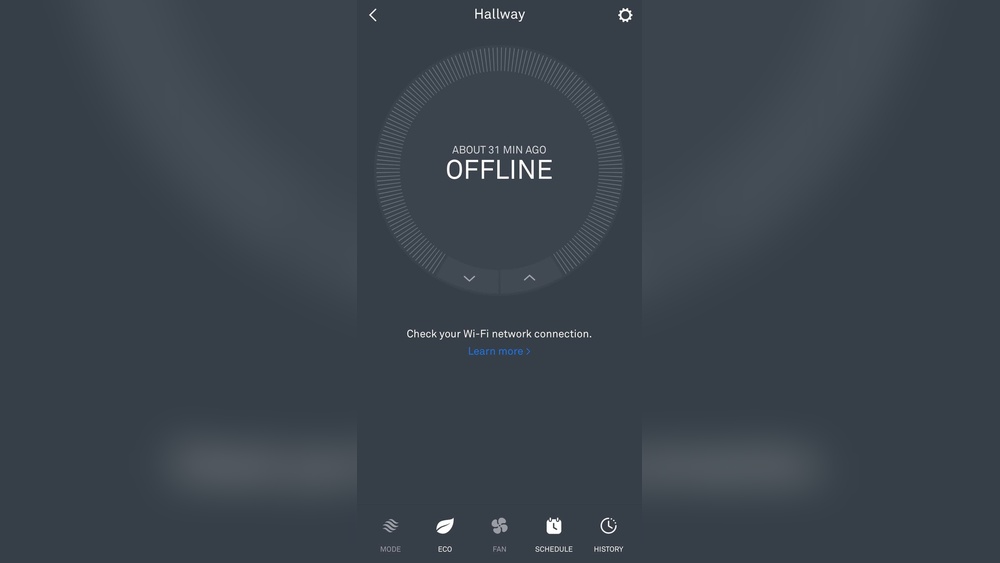
Is your Nest Thermostat showing as offline, leaving you frustrated and unsure what to do next? You rely on your Nest to keep your home comfortable, but when it stops connecting, it can throw off your entire routine.
Don’t worry—this issue is more common than you think, and there are simple steps you can take to fix it. Keep reading to discover why your Nest Thermostat might be offline and how you can get it back online quickly.
Your comfort is just a few easy fixes away.
Credit: www.reddit.com
Common Reasons For Offline Status
Your Nest Thermostat may show offline for several reasons. Understanding these common causes helps fix the problem quickly. Most issues relate to connectivity, power, or settings. Checking each area step-by-step can restore your thermostat’s connection.
Wi-fi Connectivity Issues
Wi-Fi problems often cause the Nest Thermostat to go offline. Weak signals or network interruptions break the connection. Routers placed far from the thermostat reduce signal strength. Network changes, like a new password, also disrupt connection. Restarting the router or moving it closer can help.
Power Supply Problems
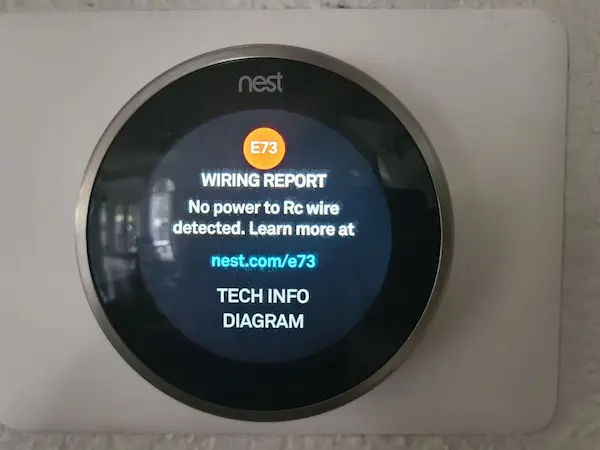
Power supply issues stop the thermostat from working properly. The device needs a steady power source to stay online. Loose wiring or a faulty C-wire can cause power loss. Battery drainage may also lead to offline status. Checking wires and power sources ensures the thermostat runs smoothly.
Software Glitches
Software bugs can make the Nest Thermostat offline. Outdated firmware or failed updates cause connection errors. Restarting the thermostat can fix minor glitches. Sometimes, a factory reset is needed to clear persistent issues. Keeping the software updated prevents many problems.
Account And Network Settings
Incorrect account or network settings may disconnect the thermostat. Logging out or changing passwords affects device access. The thermostat must be linked to the correct Google account. Network settings like IP address conflicts also cause offline status. Double-checking account info and network details helps maintain connection.

Credit: www.reddit.com
Quick Fixes To Reconnect Nest
Having your Nest Thermostat go offline can be frustrating. Quick fixes often solve the issue fast. Trying simple steps saves time and avoids deeper problems. These easy actions help restore the connection and get your thermostat working again.
Restarting The Thermostat
Restarting the Nest Thermostat can clear minor glitches. Press and hold the thermostat ring for about 10 seconds. Wait for the screen to turn off and on again. This simple step often fixes connection problems.
Checking Wi-fi Network
Check your Wi-Fi network to ensure it works well. Make sure your router is on and connected. Verify the Nest is near the router with a strong signal. Weak signals or network issues can cause the thermostat to go offline.
Resetting Network Settings
Resetting network settings removes old connections and errors. Open the thermostat settings menu and select “Network.” Choose “Forget Network” and reconnect by entering your Wi-Fi password again. This step can solve many connection troubles.
Updating Firmware
Firmware updates improve device stability and fix bugs. Check for updates in the Nest app or thermostat settings. Install any available updates to keep the system current. Updated firmware helps maintain a steady connection.
Advanced Troubleshooting Steps
Advanced troubleshooting helps solve complex Nest Thermostat issues. It goes beyond basic checks and digs deeper into possible causes. These steps require some patience and careful handling but often restore connectivity.
Follow these methods carefully to avoid damaging your device. Each step targets a specific problem area that might cause the offline status.
Factory Resetting The Device
Resetting your Nest Thermostat clears all settings and data. This can fix software glitches causing offline problems. To reset, go to Settings, then select Reset. Choose “All Settings” to start fresh. After the reset, set up the device again through the Nest app.
Inspecting Wiring And Power Source
Check the wiring behind your thermostat carefully. Loose or damaged wires can cut power and cause disconnection. Ensure the wires fit snugly and show no signs of wear. Verify your HVAC system provides constant power. A power issue often leads to offline status.
Verifying Router Settings
Confirm your router allows the Nest Thermostat to connect. Some routers block devices by default or limit connections. Check for MAC address filtering and disable it if active. Make sure the router uses a supported Wi-Fi band. Nest works best on 2.4 GHz networks.
Check Best Thermostat Pricing in Amazon
** As an Amazon Associate, I earn from qualifying purchases.
Using The Nest App For Diagnostics
The Nest app offers diagnostic tools to check device status. Open the app and select your thermostat. Use the “Device Information” to see connectivity details. Run any available tests for Wi-Fi and software updates. Follow app suggestions to fix identified problems.
Preventing Future Disconnections
Preventing future disconnections keeps your Nest Thermostat working smoothly. Staying connected helps you control your home’s temperature anytime. Simple steps can reduce offline issues and improve your experience.
Optimizing Wi-fi Signal
Place your router near the thermostat for a strong signal. Avoid walls and large objects between them. Use a Wi-Fi extender if the signal is weak. Check your internet speed regularly to ensure stability.
Regular Firmware Updates
Keep your thermostat software up to date. Updates fix bugs and improve connection stability. Set your device to update automatically. Check the Nest app for any pending updates.
Maintaining Consistent Power
Ensure your thermostat has steady power. Avoid frequent power outages or circuit interruptions. Use a reliable power source and check wiring regularly. A stable power supply prevents unexpected offline status.
Setting Up Alerts And Notifications
Enable alerts in the Nest app for connection issues. Immediate notifications help you act quickly. Customize alert settings to suit your needs. Staying informed helps prevent long offline periods.
When To Contact Support
Knowing when to contact support for your Nest Thermostat is important. Not all issues can be fixed with simple steps. Sometimes, problems need expert help to ensure your thermostat works properly again.
Getting the right support at the right time saves you from more trouble. It helps keep your home comfortable and avoids extra costs.
Identifying Hardware Failures
Hardware failures can cause your Nest Thermostat to go offline. Signs include a blank screen or buttons that do not respond. If the device does not power on after trying basic fixes, a hardware problem might be the cause. Support teams can help confirm if the thermostat needs repair or replacement.
Warranty And Replacement Options
Check your Nest Thermostat warranty before contacting support. The warranty may cover repairs or a free replacement. Support can guide you through the warranty process. They provide clear instructions on how to claim your benefits without hassle.
Professional Installation Services
Incorrect installation often causes the thermostat to go offline. Support can recommend professional installers in your area. Experts ensure your device is set up correctly. This service helps prevent future connection problems and keeps your system working smoothly.
Credit: nerdplusart.com
Frequently Asked Questions
Why Is My Nest Thermostat Showing Offline Status?
Your Nest thermostat may show offline due to Wi-Fi issues, router problems, or power interruptions. Check your internet connection and restart the thermostat to fix this.
How Can I Reconnect My Nest Thermostat To Wi-fi?
Go to your thermostat’s settings, select Network, and choose your Wi-Fi. Enter your password carefully and ensure the signal is strong for a stable connection.
What Causes Frequent Nest Thermostat Disconnections?
Frequent disconnections often result from weak Wi-Fi signals, router settings, or software bugs. Update your thermostat firmware and place the router closer to improve stability.
Can Power Outages Make Nest Thermostat Go Offline?
Yes, power outages or HVAC system issues can cause your Nest thermostat to lose connection. Verify the wiring and restore power to resolve the offline status.
Conclusion
A Nest thermostat goes offline for simple reasons like Wi-Fi issues or power problems. Checking your internet and device connections often fixes the problem fast. Restarting the thermostat can also help restore the link. Keeping your firmware updated prevents many offline errors.
Knowing these quick steps saves time and keeps your home comfortable. Stay calm and try these tips before calling support. Your thermostat will likely come back online soon. Small fixes make a big difference in smart home comfort.
Check Best Thermostat Pricing in Amazon
** As an Amazon Associate, I earn from qualifying purchases.




