

Check Best Thermostat Pricing in Amazon
** As an Amazon Associate, I earn from qualifying purchases.
Have you ever stared at your thermostat and wondered, “What does the hold button actually do?” You’re not alone. That little button can seem confusing, but it holds the key to controlling your home’s temperature just the way you want it.
Understanding how the hold button works can save you money, boost your comfort, and give you full control over your heating and cooling. Keep reading, and you’ll discover exactly why this simple feature could make a big difference in your daily life.
Purpose Of The Hold Button
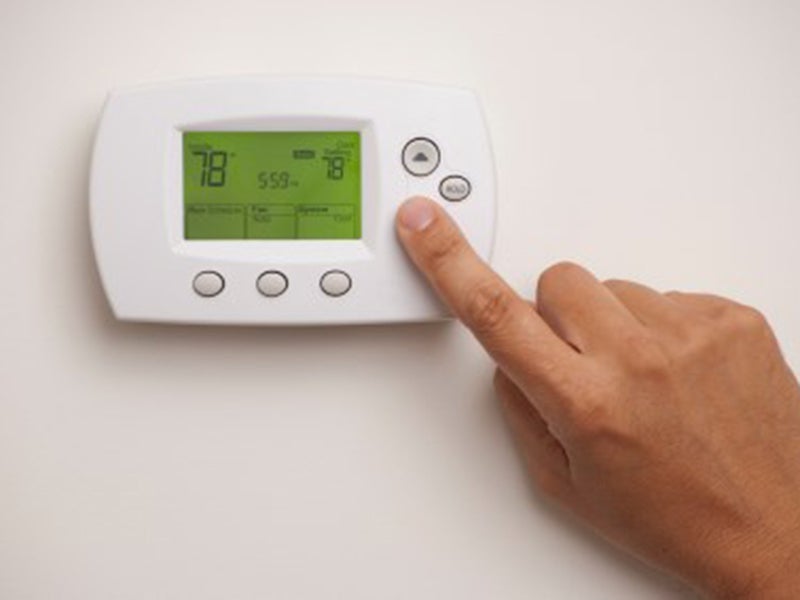
The hold button on a thermostat lets you keep the temperature steady. It stops the thermostat from changing temperatures automatically. This feature helps maintain a comfortable temperature without interruptions. You can use it when you want to keep the same setting for a while.
How It Affects Temperature Settings
Pressing the hold button freezes the current temperature setting. The thermostat ignores its usual schedule. It keeps heating or cooling at that fixed temperature. This means no automatic changes happen until you cancel the hold. The hold overrides any pre-set programs temporarily.
When To Use The Hold Button
Use the hold button during special occasions or changes in your routine. For example, when guests visit or you stay home all day. It works well if you want consistent comfort. Also, use it if your schedule varies for a day or two. The hold keeps the temperature steady without resetting your normal program.
Credit: www.fourseasonsheatingcooling.com
Types Of Hold Options
The hold button on a thermostat lets you stop the usual schedule. It keeps the temperature steady at your chosen setting. Different types of hold options help you control your home’s climate easily. Each type fits different needs and situations.
Temporary Hold
A temporary hold changes the temperature for a short time. It keeps the setting until the next scheduled change. Use it if you want a quick change without changing the whole plan. After the hold ends, the thermostat goes back to normal.
Permanent Hold
A permanent hold keeps the temperature steady until you change it. It ignores the regular schedule. This is good if you want one constant temperature for days. You must turn off the hold to use the schedule again.
Vacation Hold
A vacation hold saves energy while you are away. It sets the temperature to a low or high level. This helps lower your heating or cooling costs. When you return, the thermostat switches back to normal settings.
Benefits Of Using The Hold Button
The hold button on a thermostat offers several useful benefits. It lets you take control of your home’s temperature without changing the programmed schedule. This feature helps manage your heating and cooling more efficiently. Using the hold button can improve comfort, save energy, and prevent schedule conflicts.
Energy Savings
Using the hold button helps reduce energy waste. It keeps the temperature steady without frequent changes. This means your system runs less often. A steady temperature avoids overheating or overcooling your home. This simple action lowers your energy bills.
Comfort Control
The hold button keeps your home comfortable for longer. It stops the thermostat from switching to a preset schedule. You can set the temperature to what feels right. No sudden changes in heat or cool air. It helps maintain a steady, cozy environment.
Avoiding Schedule Conflicts
Sometimes the programmed schedule does not fit your day. The hold button pauses the schedule to avoid conflicts. It prevents the thermostat from changing temperatures unexpectedly. This is useful during special events or guests. You stay in control without resetting the whole program.
Credit: www.climatedesign.com
How To Set The Hold Button
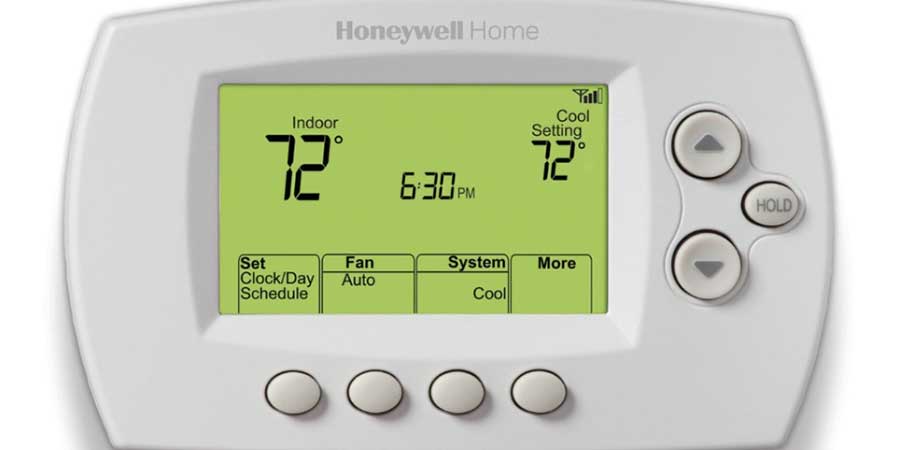
The hold button on a thermostat lets you keep your temperature setting steady. It stops the thermostat from changing temperatures automatically. Setting the hold button is simple and useful. This section explains how to set it correctly. Follow these steps to control your home’s temperature easily.
Step-by-step Instructions
First, find the hold button on your thermostat. It is often labeled as “Hold” or “Hold Temp.”
Press the hold button once to activate the hold mode. The display will show the current temperature setting.
Use the up or down arrows to adjust the temperature to your desired level. Set it to a comfortable temperature for your home.
After setting the temperature, wait a few seconds. The thermostat will save the hold setting automatically.
To cancel the hold, press the hold button again or select the “Run” or “Auto” mode. This lets the thermostat follow its normal schedule.
Common Mistakes To Avoid
Do not forget to press the hold button only once. Pressing it multiple times can confuse the thermostat.
Avoid setting the hold temperature too high or too low. This wastes energy and raises bills.
Check Best Thermostat Pricing in Amazon
** As an Amazon Associate, I earn from qualifying purchases.
Do not leave the hold mode on for too long. It can prevent your home from adjusting to daily changes.
Never ignore the thermostat display. Check it to make sure the hold is active and the temperature is correct.
Troubleshooting Hold Button Issues
The hold button on a thermostat helps keep the temperature fixed. Sometimes, this feature might not work right. Problems with the hold button can cause discomfort or energy waste. Knowing how to fix these issues can save time and money.
Hold Not Working Properly
The hold button may not work if the thermostat has a glitch. Dirt or dust inside the device can block the button. Batteries that are low can also cause problems. Sometimes the system settings may conflict with the hold mode. A software bug can stop the hold function from activating.
Check if the button feels stuck or loose. Try pressing it firmly or cleaning around it. Look at the thermostat display for error messages. Confirm the batteries are fresh and inserted right. Make sure the system is set to allow hold mode.
Resetting The Thermostat
Resetting the thermostat can fix many issues. It clears small errors and refreshes the system. Find the reset button or switch on your thermostat. Hold it down for a few seconds until the screen changes. The thermostat will restart and may reset settings to default.
After resetting, test the hold button again. Reprogram your preferred temperature and schedule. Resetting does not harm the thermostat but may remove custom settings. This step often solves problems without needing repairs.
Comparing Hold With Other Thermostat Features
The hold button on a thermostat helps keep the temperature fixed. It stops the system from following the preset schedule. This feature is useful if you want the same temperature for some time. Other thermostat features also control temperature but work differently. Understanding these differences helps you choose the best option for your needs.
Hold Vs. Schedule Mode
Schedule mode sets temperatures for different times of the day. It changes the heating or cooling automatically. The hold button pauses this schedule. It keeps the temperature steady until you turn off hold. Use hold for short-term comfort, like during a visit. Schedule mode is better for daily energy savings.
Hold Vs. Smart Thermostat Overrides
Smart thermostats learn your habits and adjust settings automatically. Overrides let you temporarily change the temperature. The hold button stops all automatic changes completely. Overrides usually return to the schedule after a set time. Hold keeps the temperature fixed until you cancel it. Overrides offer more flexibility than the hold button.
Energy Efficiency Tips With The Hold Button
The hold button on a thermostat helps control your home’s temperature efficiently. It keeps the thermostat at one setting until you change it. This can save energy and reduce your bills when used right. Understanding how to use the hold button can improve your home’s energy use.
Maximizing Savings
Use the hold button to keep your home at an energy-saving temperature. Set it to a cooler temperature in winter when you are not home. In summer, set it warmer to avoid wasting energy. This stops the thermostat from changing settings automatically. It helps avoid heating or cooling an empty house.
Remember to set the hold temperature based on your schedule. Lower the heat or raise the cooling during work or sleep hours. This simple step can cut energy use without losing comfort. Small changes add up to big savings over time.
When Not To Use Hold
Avoid using the hold button if your schedule changes often. It can cause the system to run longer than needed. This wastes energy and increases bills. Also, do not use hold during mild weather when natural temperature is comfortable.
Let your thermostat run its normal program during these times. It adjusts settings automatically to save energy. Using hold at the wrong time can reduce efficiency. Use it only when you plan to keep a steady temperature for hours.
Credit: www.reddit.com
Frequently Asked Questions
What Does The Hold Button Do On A Thermostat?
The hold button stops the thermostat’s schedule and locks in the current temperature. It maintains this set temperature until you manually change it or cancel the hold.
When Should I Use The Hold Button On My Thermostat?
Use the hold button when you want a consistent temperature for a specific period. It’s helpful during unusual schedules or extended absences from home.
Does The Hold Button Save Energy On A Thermostat?
The hold button can save energy by preventing unnecessary temperature changes. However, using it incorrectly may increase energy use, so set it wisely.
How Do I Cancel The Hold Function On My Thermostat?
To cancel the hold, press the hold button again or select “resume schedule. ” This lets the thermostat return to its programmed temperature settings.
Conclusion
The hold button stops your thermostat from changing settings. It keeps the temperature steady until you change it again. This helps save energy and keeps your home comfortable. Use it when you want to pause automatic schedules. Knowing how to use the hold button makes your thermostat easier to control.
It gives you simple, clear control over your heating or cooling. Try it next time you want consistent temperature without hassle. Easy and useful.
Check Best Thermostat Pricing in Amazon
** As an Amazon Associate, I earn from qualifying purchases.




