
Check Best Thermostat Pricing in Amazon
** As an Amazon Associate, I earn from qualifying purchases.
Have you ever wondered whether your thermostat fan should be set to “On” or “Auto”? It might seem like a small detail, but this choice can impact your comfort, energy bills, and even the lifespan of your HVAC system.
If you’re unsure which setting is best for your home, you’re not alone. You’ll discover the key differences between the two options and how to make the right decision for your needs. Keep reading—your comfort and savings depend on it!
Thermostat Fan Modes
Thermostat fan modes control how the fan in your HVAC system works. These modes affect air circulation and energy use. Choosing the right mode can improve comfort and lower bills.
There are two main fan modes: On and Auto. Each has different benefits and uses. Understanding these helps you get the best from your heating and cooling.
Fan On Mode
In Fan On mode, the fan runs all the time. It blows air constantly, even when the system is not heating or cooling. This keeps air moving in the house.
This mode helps keep air fresh and evenly spread. It can also reduce hot or cold spots. But it uses more electricity since the fan never stops.
Fan Auto Mode
Fan Auto mode runs the fan only during heating or cooling cycles. The fan stops when the system is off. This saves energy and lowers electricity costs.
This mode still keeps your home comfortable by running the fan when needed. It prevents unnecessary air movement and noise. Most people choose Auto for daily use.
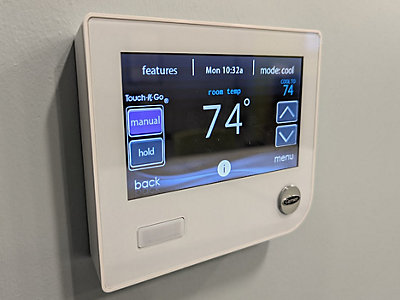
Credit: buckeyeheat.com
Benefits Of Fan On
Choosing the fan setting on your thermostat can affect your home’s comfort and air quality. Setting the fan to “On” offers several benefits. It keeps air moving through your home constantly. This helps maintain a steady temperature. It also supports cleaner air by filtering it more often.
Continuous Air Circulation
With the fan set to “On,” air flows through your home all day. This stops hot or cold spots from forming. Your rooms feel more balanced in temperature. Circulating air can prevent stale air from lingering. It creates a fresh atmosphere inside your home. Constant airflow also helps your HVAC system work more evenly.
Improved Air Filtration
The fan running continuously pulls air through your filters more often. This traps dust, pollen, and other particles better. Cleaner air means fewer allergens and irritants in your home. It can benefit people with allergies or asthma. Regular filtration keeps your system cleaner too. This can reduce maintenance and extend your HVAC’s life.
Advantages Of Fan Auto
Choosing the fan setting on your thermostat affects how your heating and cooling system runs. Setting the fan to “Auto” offers several key benefits. It keeps your system running smartly and helps save energy.
Fans set to Auto only run when heating or cooling is active. This simple step improves comfort and lowers costs.
Energy Efficiency
The fan runs less often with the Auto setting. It only turns on during heating or cooling cycles. This reduces electricity use significantly. Less energy means lower utility bills. It also helps the environment by cutting waste.
Reduced Wear And Tear
Running the fan constantly causes parts to wear out faster. Auto mode limits fan operation to necessary times. This reduces stress on the motor and fan blades. Your system lasts longer and needs fewer repairs. It saves money on maintenance and replacement costs.
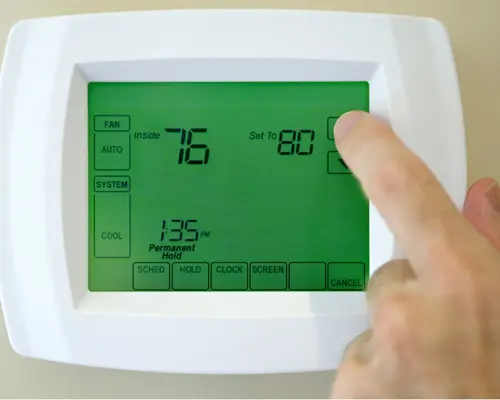
Credit: www.ars.com
Impact On Indoor Air Quality
The setting of your thermostat fan affects the air inside your home. It changes how clean and fresh the air feels. Choosing the fan to be on or auto impacts indoor air quality in different ways.
Airborne Particles And Allergens
The fan set to “on” helps move air constantly. This keeps particles and allergens from settling. Dust and pollen get trapped in the filter more often. It cleans the air better than the “auto” setting.
With the fan on “auto,” the fan runs only during heating or cooling. Air movement stops when the system is off. This lets dust and allergens settle more in the air. The air may feel less fresh between cycles.
Humidity Control
Humidity affects how healthy your indoor air feels. The fan on “auto” helps control humidity better. It runs only during heating or cooling, removing moisture effectively.
When the fan runs all the time, humidity control may weaken. Constant air movement can reduce the system’s ability to remove moisture. This may cause the air to feel damp or dry.
Energy Consumption Considerations
Energy consumption is a key factor in deciding whether to set your thermostat fan to “On” or “Auto.” The choice affects how much electricity your HVAC system uses daily. Understanding these impacts helps you make smarter decisions that save money and reduce waste.
Check Best Thermostat Pricing in Amazon
** As an Amazon Associate, I earn from qualifying purchases.
Choosing the right setting can lower your energy bills and lessen your environmental footprint. Small changes in fan operation add up over time, affecting both costs and carbon emissions.
Electricity Costs
Setting the fan to “On” means it runs continuously, even when heating or cooling is off. This constant use increases electricity consumption. Higher energy use leads to bigger monthly bills.
The “Auto” setting turns the fan on only during heating or cooling cycles. This limits energy use and reduces costs. Many users find “Auto” more budget-friendly over the long term.
Environmental Impact
Continuous fan operation uses more power, raising your home’s carbon footprint. More energy means more emissions from power plants. This contributes to air pollution and climate change.
The “Auto” mode lowers unnecessary energy use, helping reduce your environmental impact. Using less electricity supports cleaner air and conserves natural resources. It’s a small step toward greener living.
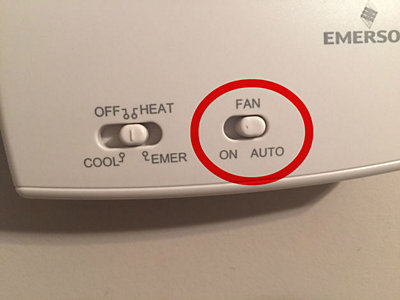
Credit: www.cooltoday.com
When To Choose Fan On
Choosing the right setting for your thermostat fan can improve comfort and air quality. The “Fan On” mode runs the fan continuously. This setting helps in specific situations. It keeps air moving even when the heater or AC is off. Use this mode to tackle humidity and allergy problems. It also helps spread air evenly in the home.
Hot And Humid Conditions
Running the fan continuously can reduce moisture in the air. It helps prevent mold and mildew growth. Fans push air through filters and vents. This removes some humidity and stale air. This setting is useful during hot, sticky days. It keeps the air fresher and cooler in rooms. It also stops air from becoming too damp or heavy.
Allergy Management
Fan On mode helps filter out dust and pollen. The fan moves air through the thermostat’s filter nonstop. This traps allergens and particles better than Auto mode. It improves indoor air quality for people with allergies. Continuous airflow can reduce sneezing and coughing. This setting supports a cleaner breathing space all day long.
When To Choose Fan Auto
Choosing the right fan setting on your thermostat affects comfort and energy use. The “Auto” fan setting runs the fan only when heating or cooling is active. This helps keep air moving without running the fan all the time. Here are some key times to select the fan on Auto.
Mild Weather
Mild weather means you don’t need constant heating or cooling. The Auto fan setting is perfect here. The fan runs only when the system adjusts temperature. This avoids unnecessary air circulation and noise. It keeps your home comfortable without wasting energy.
Energy Savings Priority
Choosing the Auto fan helps save energy. The fan stops when the HVAC system is off. This reduces electricity use and lowers bills. It also extends the life of your fan motor. For those who want to cut energy costs, Auto is the smart choice.
Tips To Optimize Thermostat Settings
Optimizing your thermostat settings helps save energy and keeps your home comfortable. Small changes can make a big difference in your utility bills. Understanding how to set your thermostat properly improves your HVAC system’s efficiency.
Here are practical tips to help you get the most from your thermostat.
Regular Maintenance
Clean or replace your HVAC filters every 1 to 3 months. Dirty filters reduce airflow and make your system work harder. Check your thermostat’s batteries and replace them yearly. Dust and dirt can affect thermostat sensors, so keep the device clean. Schedule professional HVAC inspections twice a year to ensure your system runs smoothly.
Smart Thermostat Features
Use programmable schedules to match your daily routine. Set the temperature lower at night and when no one is home. Many smart thermostats learn your preferences and adjust automatically. Take advantage of remote control through your smartphone for easy temperature changes. Use energy reports from smart thermostats to track and reduce usage.
Frequently Asked Questions
Should Thermostat Fan Be On Or Auto For Energy Savings?
Using the thermostat fan on “auto” saves energy by running the fan only when heating or cooling. “On” runs the fan continuously, increasing electricity use and costs. For most homes, “auto” is more energy-efficient and cost-effective.
What Happens If Thermostat Fan Stays On Constantly?
If the fan runs constantly, it increases electricity consumption and wear on the system. It can improve air circulation but may raise energy bills. Continuous running also causes more frequent filter changes and possible system overheating.
Does Fan On Auto Improve Air Quality?
Yes, the fan set to “auto” runs only during heating or cooling cycles, filtering air effectively. Running the fan constantly may circulate dust and allergens without filtration. Auto mode balances air quality with energy efficiency.
Can Thermostat Fan On Auto Affect System Lifespan?
Setting the fan to “auto” reduces wear by operating only as needed. Continuous fan operation can stress components, leading to faster wear and potential repairs. Using “auto” helps prolong your HVAC system’s life.
Conclusion
Choosing between fan “On” or “Auto” affects comfort and energy use. Setting the fan to “Auto” helps save power by running only when needed. The “On” mode circulates air constantly but uses more electricity. Think about your comfort and energy bills before deciding.
Many prefer “Auto” to balance cool air and cost. Try both settings to see which feels best in your home. Simple choices can improve your heating and cooling experience.
Check Best Thermostat Pricing in Amazon
** As an Amazon Associate, I earn from qualifying purchases.




