
Check Best Thermostat Pricing in Amazon
** As an Amazon Associate, I earn from qualifying purchases.
Wiring your Ecobee thermostat might seem tricky at first, but with the right guidance, you can do it yourself and save time and money. Imagine having full control over your home’s temperature with just a few simple steps.
You’ll discover exactly how to wire your Ecobee thermostat safely and correctly, even if you’re not an expert. By the end, you’ll feel confident and ready to enjoy smarter, more efficient heating and cooling. Let’s get started and make your home more comfortable today!
Credit: www.youtube.com
Tools And Materials Needed
Before wiring your Ecobee thermostat, gather all necessary tools and materials. Having everything ready makes the process smooth and safe. This step saves time and prevents errors.
Essential Tools
- Screwdriver (Phillips and flathead)
- Wire stripper or cutter
- Drill with bits (optional)
- Voltage tester
- Level tool
- Needle-nose pliers
- Flashlight or work light
Required Materials
- Ecobee thermostat kit
- Thermostat wall plate (usually included)
- Wire labels (for marking wires)
- Extra thermostat wire (if existing wire is short)
- Anchor screws and drywall anchors
- Electrical tape
- Smartphone or tablet (for setup)
Preparing For Installation
Preparing for installation is the first step to wire your Ecobee thermostat safely and correctly. This stage ensures your home and new device stay secure. Take your time and follow each step carefully.
Turn Off Power
Start by switching off the power to your heating and cooling system. Find the circuit breaker for your HVAC and flip it to the off position. This step stops electricity from flowing and prevents shocks. Double-check that the power is off by testing the old thermostat or the system controls.
Remove Old Thermostat
Carefully remove the cover of your old thermostat. Note or take a picture of the wire connections before disconnecting them. This record helps during the new installation. Unscrew the base from the wall and gently pull the wires out. Keep the wires free and neat to connect the Ecobee easily.
Identifying Wires
Before wiring your Ecobee thermostat, identifying the wires is crucial. Each wire controls different heating or cooling functions. Knowing their role helps avoid mistakes and ensures smooth installation.
Check your existing thermostat wires carefully. Label them to keep track during the switch. This step saves time and prevents confusion later.
Common Wire Colors
Thermostat wires often come in standard colors. Red (R) usually powers the system. White (W) controls heating. Yellow (Y) manages cooling. Green (G) operates the fan. Blue or black (C) is the common wire, providing continuous power.
Colors may vary. Do not rely solely on color. Always verify the wire’s function before connecting.
Checking Wire Functions
Use a multimeter to test each wire’s function. Turn off power to avoid shocks. Measure voltage between wires and the common wire. Heat wires show voltage when heating is on. Cooling wires show voltage during cooling.
Consult your HVAC manual for wire details. Mark each wire according to its function. This process helps connect your Ecobee thermostat correctly.
Wiring The Ecobee Thermostat
Wiring the Ecobee thermostat is a key step in setting up your smart thermostat. This process ensures your thermostat controls your heating and cooling systems correctly. Careful wiring helps your Ecobee work efficiently and saves energy.
Connecting The C-wire
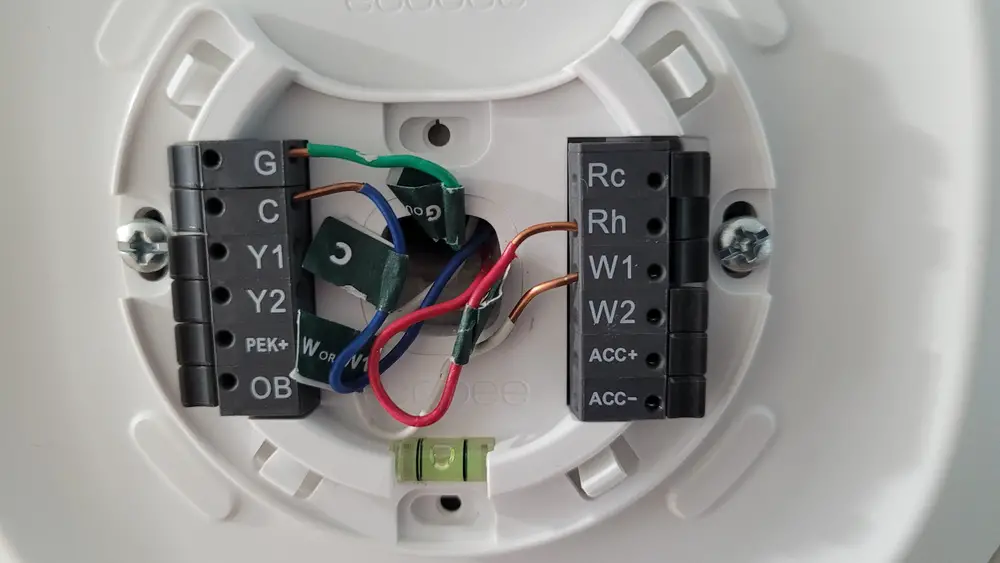
The C-wire, or common wire, provides constant power to the Ecobee. Locate the C-wire on your old thermostat or control board. Connect it to the C terminal on the Ecobee base. If your system lacks a C-wire, use the included power extender kit. This keeps your thermostat powered without interruptions.
Wiring Heat And Cool
Identify your heating and cooling wires by their labels or colors. Connect the heating wire to the W1 terminal on the Ecobee. The cooling wire goes to the Y1 terminal. For systems with multiple stages, use W2, Y2, and other terminals as needed. Tighten all screws to secure the wires firmly.
Handling Fan Wires
Fan wires control the blower fan in your HVAC system. Connect the fan wire to the G terminal on the Ecobee base. This allows the thermostat to turn the fan on or off independently. Check that the wire is secure and not loose. Proper fan wiring improves air circulation and comfort.
Mounting The Thermostat
Mounting your Ecobee thermostat is an important step to ensure it works well and looks neat. Proper mounting helps the device sense temperature accurately. It also keeps the thermostat secure on the wall. Follow each step carefully for the best results.
Attaching The Backplate
Start by placing the backplate on the wall. Use a level to keep it straight. Mark the screw holes with a pencil. Drill holes if needed. Insert wall anchors for extra support. Screw the backplate firmly onto the wall. Make sure it is tight and stable.
Check Best Thermostat Pricing in Amazon
** As an Amazon Associate, I earn from qualifying purchases.
Securing The Thermostat Unit
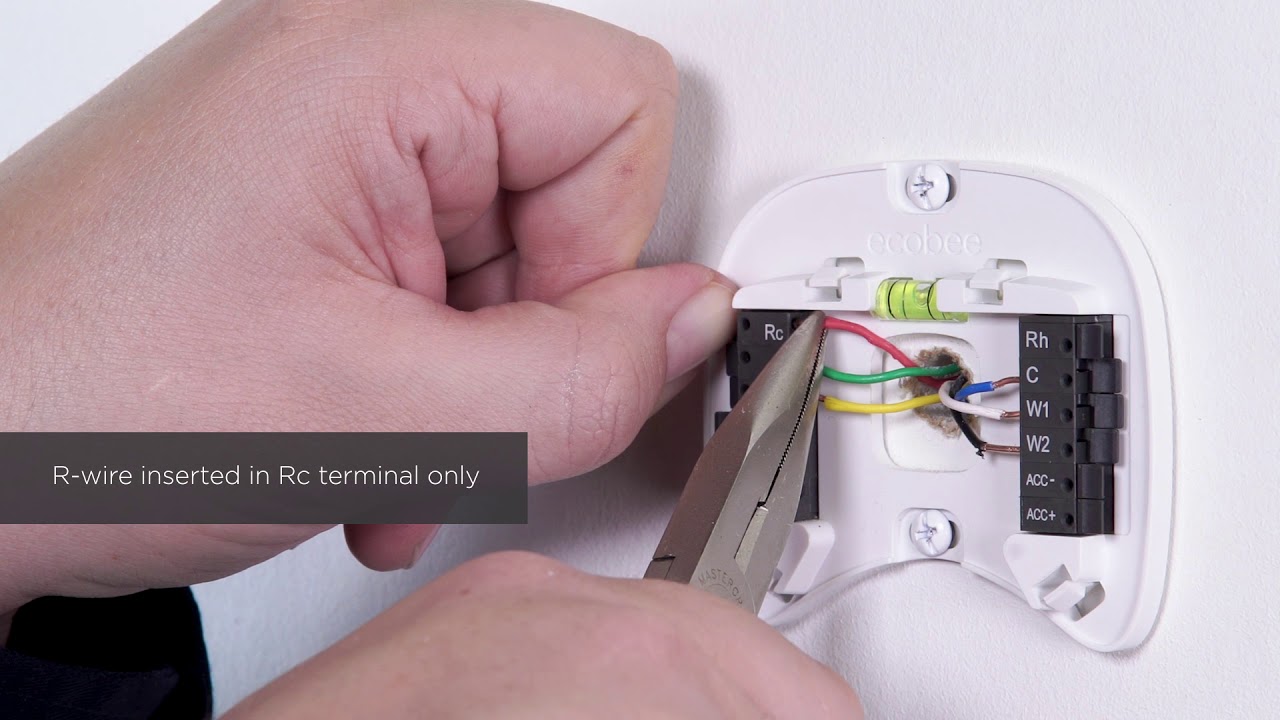
Next, connect the wires to the backplate. Push each wire into the correct terminal. Check the Ecobee guide for wire colors and positions. Once wiring is done, snap the thermostat unit onto the backplate. Press gently until it clicks into place. The unit should feel secure and not wobble.

Credit: www.reddit.com
Powering On And Setup
Powering on your Ecobee thermostat and completing the setup is the next step after wiring. This part is simple and sets the stage for your thermostat’s smart features. Take your time to ensure everything works well.
Restoring Power
After wiring, restore power to your HVAC system. Switch on the circuit breaker or fuse that controls your heating and cooling unit. Watch the Ecobee screen light up. This means the thermostat is receiving power. If the screen stays blank, double-check your wiring connections. Make sure the wires are firmly in place. Sometimes, a loose wire can stop power from reaching the thermostat.
Initial Configuration
Once powered, the thermostat starts the setup process automatically. Follow the on-screen instructions step by step. You will select your language and connect to Wi-Fi. Connecting to Wi-Fi enables remote control from your phone. Next, enter your location for accurate weather updates. The thermostat asks about your heating and cooling system type. This helps it operate efficiently. Finally, create a user account or sign in. This step allows you to access smart features and updates.
Troubleshooting Tips
Troubleshooting your Ecobee thermostat wiring can save time and prevent damage. Simple checks often fix common problems. Follow these tips to ensure your thermostat works properly.
Common Wiring Issues
Check the wires carefully before connecting. Loose or wrong wires cause the thermostat to fail. Look for wires that are not fully inserted or damaged. Make sure each wire matches the terminal on the Ecobee. Avoid mixing wires with similar colors.
Confirm that the power is off before touching wires. This step keeps you safe and protects the device. If the thermostat does not power on, check the C wire. A missing or weak C wire often causes power problems. Use a multimeter to test voltage if you can.
Resetting The Thermostat
Resetting the Ecobee can fix software or connection issues. To reset, go to the main menu on the screen. Select Settings, then choose Reset. You can pick a full reset or just restart the thermostat. Full reset clears all settings and data.
Try a restart first for minor problems. After resetting, reconfigure your thermostat settings. This step ensures everything works as expected. Keep your wiring checked during and after reset. Proper wiring helps avoid repeated issues.

Credit: support.ecobee.com
Frequently Asked Questions
What Tools Are Needed To Wire An Ecobee Thermostat?
You will need a screwdriver, wire stripper, drill, and voltage tester. These tools ensure safe, precise wiring and installation of your Ecobee thermostat.
How To Identify Ecobee Thermostat Wires?
Check the wire labels or colors matching your HVAC system. Ecobee uses standard wire codes like R, C, W, Y, and G for easy identification.
Can I Wire Ecobee Without A C-wire?
Yes, but Ecobee may require a Power Extender Kit or a C-wire adapter for continuous power if your system lacks a C-wire.
How To Safely Turn Off Power Before Wiring Ecobee?
Switch off the HVAC system’s circuit breaker at your electrical panel. This prevents electrical shocks and protects your thermostat during wiring.
Conclusion
Wiring your Ecobee thermostat can save energy and money. Follow each step carefully to avoid mistakes. Double-check all wires before turning on power. The thermostat will help keep your home comfortable year-round. Take your time and stay safe during installation.
Enjoy smarter control of your heating and cooling system. Simple steps can make a big difference in your home. Now, you are ready to enjoy your new thermostat.
Check Best Thermostat Pricing in Amazon
** As an Amazon Associate, I earn from qualifying purchases.




