
Check Best Thermostat Pricing in Amazon
** As an Amazon Associate, I earn from qualifying purchases.
Have you ever walked into a room only to find it too hot or too cold? Setting the right temperature on your thermostat can make all the difference in your comfort and energy bills.
But if you’re unsure how to adjust your thermostat properly, you’re not alone. This guide will walk you through simple steps to set your thermostat just right, so you can enjoy a cozy home without wasting energy. Keep reading to learn easy tips that will help you control your indoor climate like a pro.
Choosing The Right Thermostat
Choosing the right thermostat is important for comfort and energy savings. The right device controls your home’s temperature easily. It fits your lifestyle and home heating system. Understanding the types and features helps in making the best choice.
A good thermostat keeps your home cozy and lowers energy bills. It also makes temperature control simple and convenient. Let’s explore the main types and compare smart and manual models.
Types Of Thermostats
Thermostats come in different types based on how they work. The most common are digital, programmable, and mechanical. Digital thermostats show the temperature on a screen. Programmable thermostats let you set schedules for heating and cooling. Mechanical thermostats use a dial to adjust temperature manually. Each type offers different levels of control and ease of use.
Smart Vs. Manual Models
Smart thermostats connect to Wi-Fi and learn your habits. They adjust temperature automatically to save energy. You can control them from a phone app anywhere. Manual thermostats need you to change settings by hand. They are simple and usually less expensive. Smart models offer more convenience and features. Manual ones are good for basic use and easy setup.
Credit: www.scanaenergy.com
Preparing Your Thermostat
Preparing your thermostat is the first step to setting the right temperature. This ensures your home stays comfortable and energy use stays low. Knowing where your thermostat is and checking its power helps avoid problems later.
Locating The Thermostat
Find the thermostat on a wall inside your home. It is often in a living room or hallway. Avoid places near windows, doors, or direct sunlight. These spots can give false temperature readings.
Look for a small device with a screen and buttons. It may also have a dial or touch controls. If unsure, check your home manual or ask a family member.
Checking Power And Batteries
Make sure the thermostat has power to work correctly. Some models plug into the wall, while others use batteries. Check the screen for any signs of low power or error messages.
If your thermostat uses batteries, replace them every year. Use fresh batteries to avoid interruptions. For plug-in models, ensure the power outlet is working well.
Setting The Temperature
Setting the temperature on your thermostat is simple and helps keep your home comfortable. You can control the heat or cool air by choosing the right temperature. This section explains how to adjust the thermostat for both heating and cooling modes.
Adjusting For Heating Mode
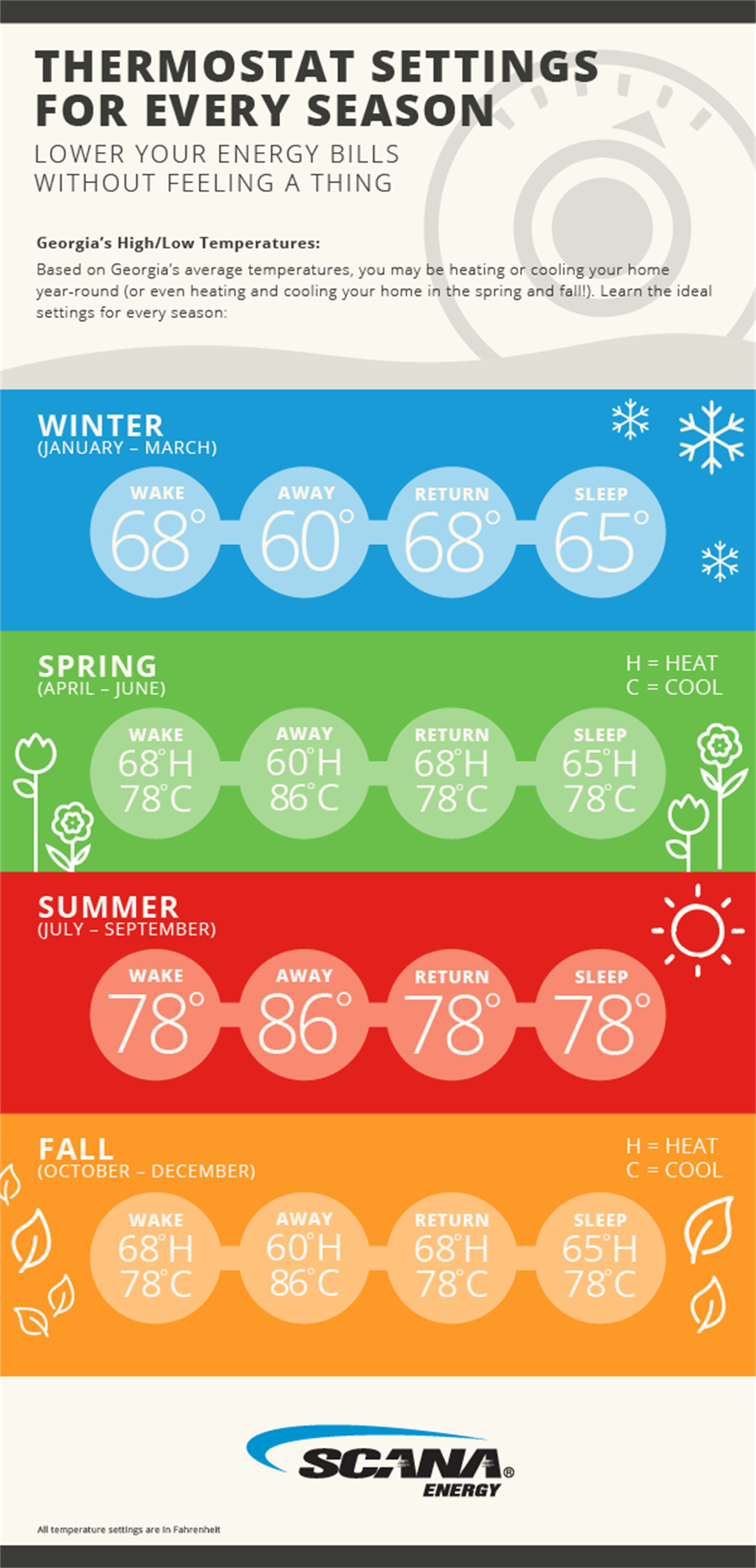
In heating mode, set the temperature higher than the current room temperature. This tells your heater to warm the room. Start with a comfortable level, like 68°F (20°C). Change the temperature in small steps for the best comfort and energy use. Avoid setting it too high to save power and keep bills low.
Adjusting For Cooling Mode
Cooling mode requires setting the temperature lower than the room temperature. This makes the air conditioner cool the space. Try a temperature around 75°F (24°C) for a cool but not too cold room. Adjust slowly to find the ideal balance between comfort and energy use. Do not set it too low to avoid wasting energy.

Credit: www.youtube.com
Optimizing Comfort Settings
Optimizing comfort settings on your thermostat helps keep your home cozy and energy-efficient. Adjusting the temperature at the right times saves money and improves your comfort. Simple features in most thermostats make this easy to do. Focus on using schedules and special modes to fit your daily routine.
Check Best Thermostat Pricing in Amazon
** As an Amazon Associate, I earn from qualifying purchases.
Using Schedule Features
Schedule features let you set different temperatures for different times. You can make the house warmer in the morning and cooler during the day. This avoids wasting energy when no one is home. Most thermostats allow you to create daily or weekly schedules. Choose temperatures that match your lifestyle to stay comfortable all day.
Setting Away And Sleep Modes
Away mode lowers the temperature when you leave the house. It keeps your home safe and saves energy. Sleep mode sets a cooler or warmer temperature for better rest. Adjust these modes to suit your comfort needs. They help reduce energy use without sacrificing warmth or coolness.
Troubleshooting Common Issues
Troubleshooting common thermostat issues helps keep your home comfortable. Problems can stop your thermostat from working right. Fixing these quickly saves energy and avoids frustration.
Thermostat Not Responding
Check the power first. Batteries might be dead or loose. Replace batteries if needed. Make sure the thermostat is turned on. Look for a reset button and press it. Sometimes, restarting the thermostat solves the problem. If it still does not work, check the circuit breaker. A tripped breaker could cut power to the thermostat.
Inaccurate Temperature Readings
Thermostat sensors can get dirty or blocked. Clean the sensor gently with a soft cloth. Avoid placing the thermostat near windows or direct sunlight. Heat from the sun can cause wrong readings. Keep the thermostat away from vents or drafts. These can also affect temperature accuracy. Calibrate your thermostat if the temperature is still off. Consult the manual for calibration steps or contact support.

Credit: www.wikihow.com
Maintaining Your Thermostat
Maintaining your thermostat helps it work well and last longer. Small tasks keep your system reliable and save energy. Regular care stops issues before they start. This makes your home comfortable all year.
Regular Cleaning Tips
Dust and dirt can block thermostat sensors. Use a soft brush or cloth to clean the surface. Avoid water or spray cleaners. Check vents nearby and clear dust from them too. Clean monthly to keep the thermostat responsive and accurate.
When To Replace Batteries
Many thermostats need batteries to run properly. Change batteries at least once a year. Low batteries cause the thermostat to lose settings or stop working. Use fresh, good-quality batteries. Test the thermostat after replacement to ensure it works well.
Frequently Asked Questions
How Do I Set The Temperature On My Thermostat?
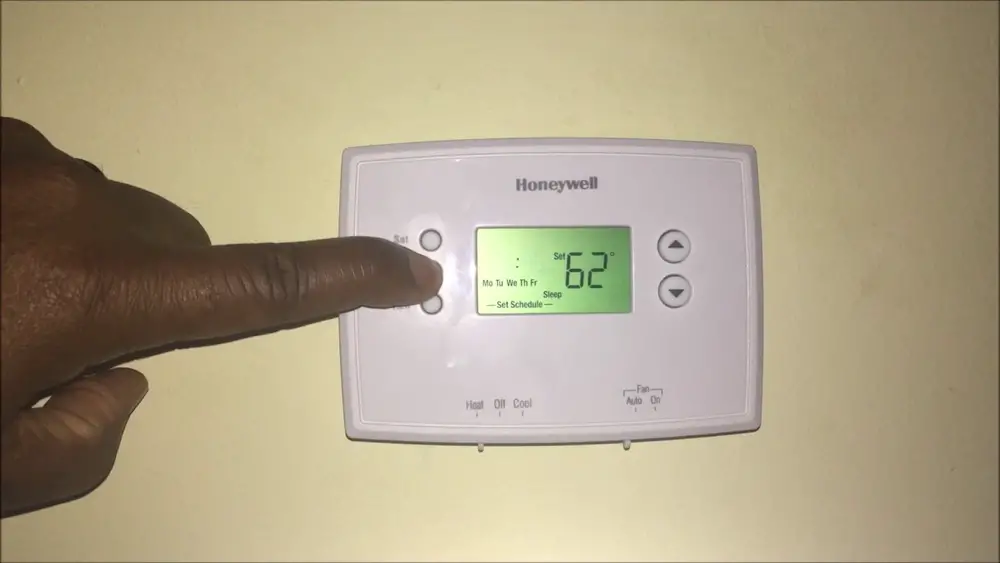
To set the temperature, press the up or down arrow buttons on your thermostat. Adjust until the desired temperature shows. Confirm settings if needed. This controls your heating or cooling system to maintain comfort.
What Is The Ideal Thermostat Temperature For Energy Saving?
Set your thermostat to 68°F (20°C) in winter and 78°F (26°C) in summer. This balance keeps your home comfortable and reduces energy bills effectively.
Can I Program My Thermostat For Different Times?
Yes, programmable thermostats allow setting different temperatures for various times. This saves energy by adjusting heating/cooling when you’re away or asleep.
Why Won’t My Thermostat Temperature Change?
Check if the thermostat is properly connected to power and HVAC system. Replace batteries if needed. Also, ensure the system is not in “off” or “hold” mode.
Conclusion
Setting your thermostat temperature is simple and helps save energy. Choose a comfortable number for your home. Adjust the settings based on the weather outside. Remember to lower the temperature at night or when away. This keeps your bills lower and your home cozy.
Check your thermostat often to make sure it works well. Small changes can make a big difference. Enjoy a nice, warm or cool home all year. Easy steps, smart choices. That’s how you control your thermostat right.
Check Best Thermostat Pricing in Amazon
** As an Amazon Associate, I earn from qualifying purchases.




