
Check Best Thermostat Pricing in Amazon
** As an Amazon Associate, I earn from qualifying purchases.
Is your thermostat acting up or showing a low battery warning? Changing the batteries might be the simple fix you need.
You don’t have to call a professional or struggle with complicated instructions. In this guide, you’ll learn exactly how to change thermostat batteries quickly and easily. By the end, you’ll feel confident keeping your home’s temperature just right without any hassle.
Keep reading to find out how a small change can make a big difference in your comfort.
Signs Your Thermostat Needs New Batteries
Thermostats need batteries to work properly. Over time, these batteries lose power. Knowing the signs helps you replace them early. This keeps your home comfortable and your system running smoothly.
Dim Or Blank Display
The thermostat screen looks darker than usual. Sometimes, the display goes blank completely. This means the batteries are low or dead. Replacing the batteries usually fixes this problem fast.
Unresponsive Controls
Buttons or touch controls stop working well. You press them but nothing happens. This shows the thermostat lacks enough power. New batteries will make the controls respond again.
Heating Or Cooling Issues
The heating or cooling does not start on time. The system may turn off unexpectedly. This can occur when the thermostat batteries are weak. Changing the batteries can restore proper heating or cooling.

Credit: www.youtube.com
Tools And Materials Required
Before changing your thermostat batteries, gather the right tools and materials. Having everything ready makes the process quick and easy. It helps avoid mistakes and keeps you safe.
Types Of Batteries
Most thermostats use either AA or AAA batteries. Some models need coin cell batteries like CR2032. Check your thermostat’s manual or look inside the battery compartment. Use fresh batteries to ensure your thermostat works properly.
Basic Tools Needed
You usually only need a small screwdriver to open the thermostat cover. A flathead or Phillips screwdriver works for most models. Keep a clean cloth handy to rest the cover on. A flashlight helps if the area is dark. No special tools are required, making this a simple task.
Locating The Thermostat Battery Compartment
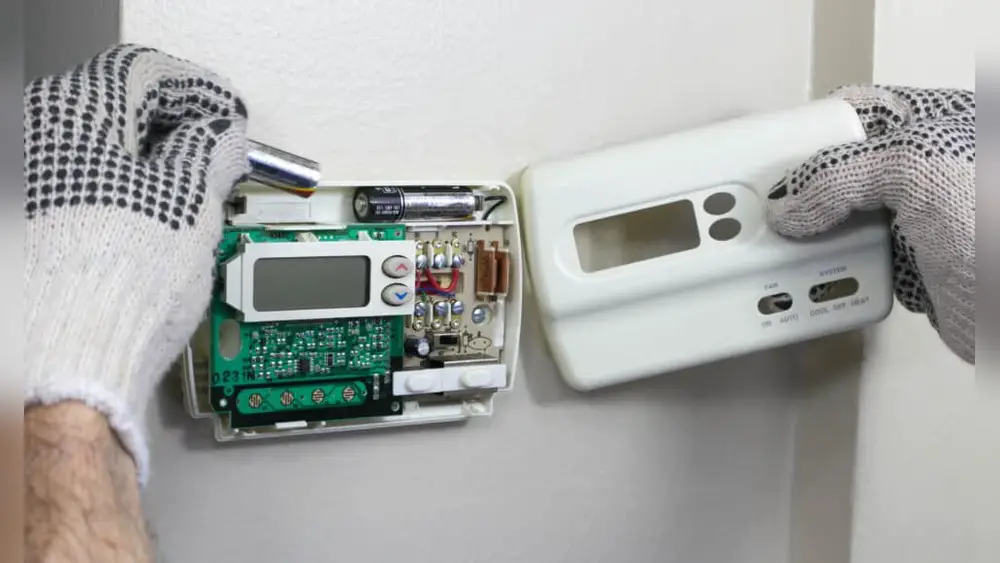
Finding the thermostat battery compartment is the first step to changing batteries. Thermostats come in different styles and models. Each has a unique way to access its batteries. Knowing where the battery compartment is helps you change batteries quickly. This section explains how to locate and open the battery cover.
Common Thermostat Designs
Most thermostats have a front cover or faceplate. The battery compartment is often behind this cover. Some models use a slide-out tray for batteries. Others have a small door on the side or bottom. Digital thermostats usually hide batteries inside the main unit. Older models might have visible battery slots. Check your thermostat’s shape and size first.
Opening The Battery Cover
Look for a small latch or tab near the faceplate. Press or slide it gently to open the cover. Some covers snap off with a soft pull. Use light pressure to avoid breaking parts. If the cover has screws, use a screwdriver to remove them. Keep screws safe for reassembly. Once open, you will see the batteries inside. Note the battery type before removal.

Credit: www.youtube.com
Removing And Replacing Old Batteries
Removing and replacing old batteries in your thermostat is simple. It keeps your heating and cooling system running smoothly. Old batteries can cause your thermostat to stop working or display wrong information. Changing them regularly ensures accurate temperature control and saves energy.
Safe Battery Removal
Turn off your thermostat before removing the batteries. This prevents damage to the device. Open the battery compartment carefully. Use gentle pressure to avoid breaking the cover. Remove the old batteries by lifting them straight out. Avoid touching battery terminals with your fingers. Dispose of old batteries properly to protect the environment.
Inserting New Batteries Correctly
Check the battery type before inserting new ones. Look for the plus (+) and minus (-) signs inside the compartment. Insert each battery with the correct polarity. Press the batteries gently into place. Close the compartment securely to avoid loose connections. Turn on the thermostat and check if it works properly.
Check Best Thermostat Pricing in Amazon
** As an Amazon Associate, I earn from qualifying purchases.
Testing Your Thermostat After Battery Change
After changing the batteries in your thermostat, testing it is important. This step ensures the device works well and keeps your home comfortable. A quick check prevents surprises like no heat or cold air when you need it most.
Checking Display And Controls
Look at the thermostat screen to see if it lights up. The display should be clear and easy to read. Press a few buttons to check if the controls respond. If the screen stays blank, the batteries might not be placed correctly. Try removing and reinstalling them carefully. Make sure the battery contacts touch the metal parts inside the compartment.
Restarting The Thermostat
Turn your thermostat off and then on again to reset it. This helps the device start fresh with the new batteries. Some models have a reset button; press it if you see one. Wait a few minutes for the thermostat to reconnect to your heating or cooling system. Check if it follows the set temperature and mode. Restarting fixes minor glitches and ensures smooth operation.
Tips For Prolonging Battery Life
Prolonging your thermostat’s battery life saves money and keeps your heating or cooling steady. Small steps help your batteries last longer. This means fewer changes and less hassle.
Follow these tips to keep your thermostat running smoothly and your batteries strong.
Regular Maintenance
Check your thermostat often for dust and dirt. Clean the surface gently with a dry cloth. Dust can cause your device to work harder and drain batteries fast. Replace batteries before they run out completely. This prevents sudden shutdowns. Test your thermostat monthly to ensure it works well.
Energy-saving Settings
Set your thermostat to energy-saving modes. Lower the temperature in winter when you are away. Raise it in summer during hot days. Use programmable settings to adjust temperatures automatically. This reduces battery use. Avoid extreme settings, which make your thermostat work harder. Small changes help your batteries last much longer.
When To Call A Professional
Changing thermostat batteries is often simple. Most people can do it themselves. Yet, some situations need a professional’s help. Knowing when to call one can save time and avoid damage. Professionals have the skills to handle tricky problems safely.
Persistent Issues
Sometimes, battery replacement does not fix the problem. The thermostat may still act strangely. It might not turn on or off properly. Strange displays or error messages can appear. These signs suggest deeper issues. A professional can diagnose and repair these faults. They use special tools and knowledge. Avoid guessing or forcing fixes yourself. This can cause more harm.
Complex Thermostat Models
Some thermostats have advanced features. Smart thermostats connect to Wi-Fi and apps. They need careful handling during battery changes. Incorrect steps might erase settings or damage parts. Professionals know how to manage these devices. They ensure the thermostat keeps working perfectly. Hiring an expert avoids costly mistakes. They also help with setup and updates.

Credit: willplumb.com
Frequently Asked Questions
How Do I Know When To Change Thermostat Batteries?
You should change thermostat batteries when the display dims or the unit stops responding. A low battery warning often appears on the screen. Regularly check batteries every 6 to 12 months to avoid heating or cooling interruptions.
What Type Of Batteries Does A Thermostat Use?
Most thermostats use standard AA or AAA alkaline batteries. Some models require button cell batteries. Always check your thermostat’s manual to confirm the correct battery type before replacement.
Can I Replace Thermostat Batteries Without Turning Off Power?
Yes, you can usually replace thermostat batteries without turning off power. Just remove the thermostat cover gently and replace the batteries. However, turning off power is safer for digital or smart thermostats.
How Do I Safely Remove Old Batteries From My Thermostat?
To remove old batteries, open the thermostat cover carefully. Use your fingers to lift batteries from the compartment. Avoid using sharp tools that might damage the unit or battery contacts.
Conclusion
Changing thermostat batteries is simple and keeps your system working well. Regular checks help avoid sudden power loss or wrong temperature settings. Use the right batteries and follow safety steps carefully. This small task saves money and ensures comfort at home.
Stay on top of battery changes to enjoy steady heating or cooling all year. A little effort goes a long way.
Check Best Thermostat Pricing in Amazon
** As an Amazon Associate, I earn from qualifying purchases.




