
Check Best Thermostat Pricing in Amazon
** As an Amazon Associate, I earn from qualifying purchases.
Is your thermostat acting up or showing a low battery warning? Changing the batteries might be the simple fix you need.
If you’ve never done it before, the process can seem confusing or intimidating. But don’t worry—this guide will walk you through each step clearly and quickly. By the end, you’ll know exactly how to replace your thermostat batteries and keep your home comfortable without any hassle.
Ready to take control of your thermostat and save yourself time and frustration? Let’s dive in.

Credit: www.moncriefair.com
Tools Needed
Changing the batteries in a thermostat is simple. Having the right tools makes the job easier. Prepare these tools before starting. It saves time and avoids frustration.
Small Screwdriver
A small screwdriver helps open the thermostat cover. Many models use tiny screws. A Phillips or flathead screwdriver usually works well. Check your thermostat to know which type fits.
New Batteries
Use fresh batteries to ensure proper function. Most thermostats need AA or AAA batteries. Check the battery compartment or manual to find the correct size. Keep spare batteries ready for quick replacement.
Soft Cloth
A soft cloth cleans dust from the thermostat. Dust can affect battery contacts. Wipe gently inside the battery area. This helps maintain good connection and performance.

Credit: willplumb.com
Locate The Thermostat
Finding the thermostat is the first step to changing its batteries. Most thermostats are easy to spot but can be in different places in your home. Knowing where to look saves time and avoids confusion.
Thermostats control your home’s heating and cooling. They are usually mounted on walls in main living areas. Check areas that are central and easy to access.
Check Near The Living Room Or Hallway
Thermostats are often placed in the living room or hallway. These spots help the device sense the room temperature well. Look at eye level on the wall for a small box with a screen or dial.
Look Close To Doors Or Entryways
Some thermostats sit near doors or entryways. This position helps detect air flow changes quickly. Scan walls next to door frames or near staircases.
Inspect Other Common Areas
Kitchens, bedrooms, or home offices can also have thermostats. Homes vary in design, so check several rooms if needed. Focus on walls that do not get direct sunlight or drafts.
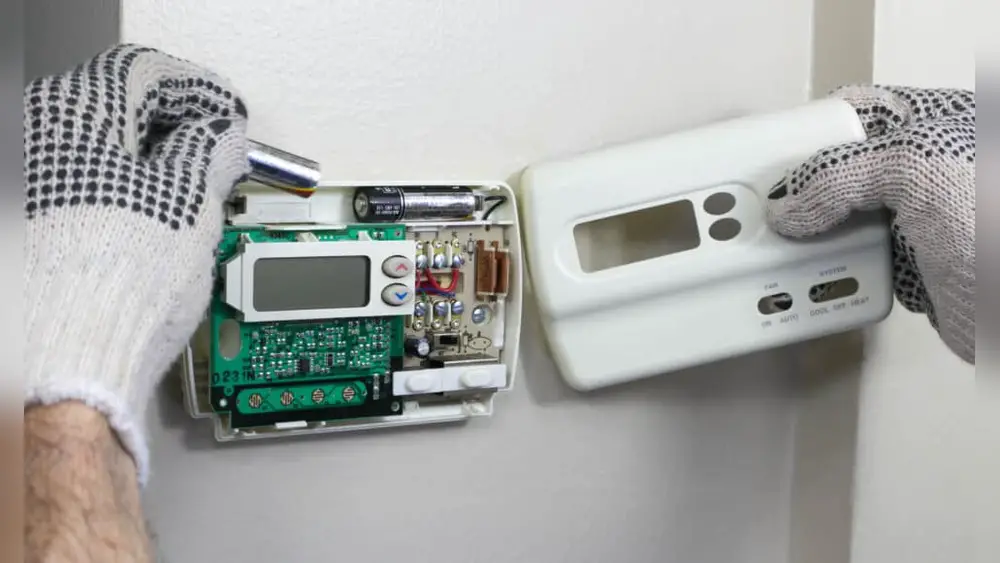
Remove The Thermostat Cover
Removing the thermostat cover is the first step to change its batteries. This part protects the internal components and battery compartment. Taking it off carefully helps avoid damage. It also lets you see the batteries clearly.
Most thermostat covers are easy to remove. Some snap off while others use small screws. Knowing your thermostat type makes the process quicker. Make sure to handle the cover gently to prevent cracks or breaks.
Locate The Thermostat Cover
Look closely at your thermostat’s front. The cover is usually the biggest visible part. It may have small tabs or edges for gripping. In some models, the cover fits tightly and needs a little force.
Use The Right Tools
Check if screws hold the cover. A small screwdriver might be needed. If no screws appear, try gently pulling the cover. Avoid using sharp tools that can scratch or break the plastic.
Remove The Cover Safely
Hold the thermostat base with one hand. Use the other hand to pull or lift the cover. Do this slowly to avoid snapping clips. Set the cover aside on a soft surface to keep it safe.
Identify The Battery Type
Identifying the battery type in your thermostat is the first step to a smooth replacement. Using the right battery ensures your thermostat works correctly. Different thermostats use different batteries. Knowing the exact type saves time and prevents damage.
Check The Thermostat Manual
The manual often lists the battery type needed. Look for a section about power or battery replacement. It may specify battery size and model number. Keep the manual handy for other maintenance tips.
Look Inside The Battery Compartment
Open the battery cover carefully. Most batteries have their type printed on the side. Common types include AA, AAA, or 9-volt batteries. Write down the number or take a photo for reference.
Identify Common Battery Types
AA and AAA batteries are cylindrical and easy to spot. 9-volt batteries are rectangular with two snap connectors. Button batteries are small, round, and flat. Knowing these helps in quick identification.
Use Online Resources
Search your thermostat model online for battery info. Manufacturer websites often have detailed guides. Use trusted sources to avoid wrong information.
Take Out Old Batteries
Removing old batteries is the first step to keep your thermostat working well. Old batteries can cause your thermostat to stop or act strange. Taking out these batteries is easy and safe. This part explains how to do it right.
Locate The Battery Compartment
Find the battery cover on your thermostat. It is usually at the back or bottom. Sometimes, you need to slide or snap open the cover. Look carefully so you do not break anything.
Use Gentle Pressure To Open
Press or slide the cover gently. Do not use too much force. If stuck, try wiggling it softly. Avoid tools that can damage the thermostat.
Remove Batteries Safely
Take out the old batteries one by one. Use your fingers or a small tool. Avoid touching the battery terminals too much. Place the old batteries aside for recycling.
Insert New Batteries
Inserting new batteries into your thermostat is a simple step that keeps your heating and cooling system running smoothly. Fresh batteries ensure your thermostat responds quickly and avoids unexpected shutdowns. This section guides you through the easy process of placing new batteries correctly.
Choose The Right Battery Type
Check your thermostat’s manual or battery compartment for the correct battery type. Most thermostats use AA or AAA batteries. Using the wrong type can cause damage or poor performance. Have the new batteries ready before you start.
Check Best Thermostat Pricing in Amazon
** As an Amazon Associate, I earn from qualifying purchases.
Insert Batteries With Correct Polarity
Look inside the battery compartment for the plus (+) and minus (-) signs. Align the new batteries according to these marks. Proper placement ensures the thermostat powers on and works well. Avoid forcing batteries into the compartment.
Close The Battery Compartment Securely
After inserting the batteries, close the battery cover firmly. A loose cover can cause poor contact and power loss. Make sure it clicks or fits tightly to keep batteries in place. This step helps your thermostat stay powered reliably.
Replace The Thermostat Cover
Replacing the thermostat cover is the final step after changing the batteries. It protects the internal parts and keeps the thermostat looking neat. Putting the cover back correctly ensures the thermostat works well and stays clean.
Take your time to align the cover properly. A loose cover can cause the thermostat to malfunction or fall off.
Check The Cover For Damage
Before replacing, inspect the cover for cracks or dirt. Clean it gently with a soft cloth if needed. A clean cover helps the thermostat display clearly.
Align The Cover With The Base
Hold the cover close to the thermostat base. Match the tabs or clips on the cover with the slots on the base. Proper alignment prevents damage and ensures a secure fit.
Snap The Cover Into Place
Press the cover firmly but carefully against the base. Listen for a click or feel it snap in. Avoid forcing it to prevent breaking the plastic parts.
Turn the thermostat on and check the display. Make sure it responds properly and the cover stays in place. This confirms the cover is installed correctly.
Test The Thermostat
Testing the thermostat after changing the batteries is important. It helps confirm the device works correctly. This step ensures your heating or cooling system responds well to the new power source.
Testing also helps detect any issues early. You avoid discomfort from a thermostat that does not function properly. Follow these steps to test your thermostat effectively.
Check The Display Screen
Look at the thermostat’s screen. It should turn on immediately after installing new batteries. If the screen is blank, batteries might be dead or not placed correctly. Replace or reposition the batteries and check again.
Adjust The Temperature Setting
Set the thermostat to a temperature higher or lower than the room’s current temperature. Watch for the heating or cooling system to start. This action confirms the thermostat sends signals properly.
Listen For System Activation
After changing the temperature, listen for the HVAC system. It should turn on within a few seconds. If no sound occurs, the thermostat might need further troubleshooting or professional help.
Observe The System Response Time
Notice how quickly the system reacts to new settings. A fast response means the thermostat and batteries work well together. Slow or no response suggests a problem with the thermostat or wiring.
Tips For Battery Maintenance
Keeping thermostat batteries in good shape saves time and prevents sudden failures. Proper battery care helps your thermostat work smoothly all year. Follow these simple tips to extend battery life and avoid unexpected replacements.
Regular checks and correct handling improve battery performance. Small habits make a big difference in battery maintenance.
Check Battery Levels Often
Test batteries every few months to catch low power early. Use a battery tester or check the thermostat’s display for alerts. Early detection stops sudden shutdowns.
Use Quality Batteries
Choose batteries from trusted brands for longer life. Cheap batteries drain quickly and may leak. Good batteries protect your thermostat and save money.
Replace All Batteries At Once
Change all batteries during a replacement, not just one. Mixing old and new batteries causes poor performance. New batteries work best together.
Keep Battery Contacts Clean
Clean the battery contacts with a dry cloth regularly. Dirt or corrosion can stop power flow. Clean contacts ensure steady energy supply.
Store Spare Batteries Properly
Keep extra batteries in a cool, dry place. Avoid heat and moisture to prevent damage. Proper storage keeps batteries fresh and ready.

Credit: sierraair.com
Frequently Asked Questions
How Do I Know When To Change Thermostat Batteries?
You should replace batteries when the thermostat display dims or shows a low battery alert. Regular checks every six months help prevent failures.
What Type Of Batteries Does A Thermostat Use?
Most thermostats use AA or AAA alkaline batteries. Check your model’s manual or inside the battery compartment for the exact type.
Can I Change Thermostat Batteries Myself?
Yes, changing thermostat batteries is simple. Turn off the thermostat, open the battery compartment, replace batteries, and close it securely.
How Often Should Thermostat Batteries Be Replaced?
Replace thermostat batteries at least once a year or when the device signals low power. Regular replacement ensures consistent performance.
Conclusion
Changing thermostat batteries is simple and saves money. Just follow the steps carefully. Use the right type of batteries for best results. Regular checks keep your thermostat working well. No need to call a technician every time. Your home stays comfortable with fresh batteries.
Small effort, big difference. Keep your system running smoothly and avoid cold or hot surprises. Easy maintenance helps your heating and cooling last longer. Try it today and feel the comfort.
Check Best Thermostat Pricing in Amazon
** As an Amazon Associate, I earn from qualifying purchases.




